




A USB4 travel hub is the small block that turns one USB-C port on a thin laptop into HDMI, fast USB, Ethernet, and a charging input, while talking to the laptop over a 40Gbps USB4 link instead of the 10Gbps USB link most budget hubs use. That extra bandwidth is what lets a palm-sized hub run a high refresh rate 4K screen, a fast SSD, and wired networking at the same time without everything slowing down. A basic USB-C hub (Best USB-C Hubs in 2026 (Portable, Not Full Docks)) is cheaper and fine for one 4K60 screen and a thumb drive. A full desk dock adds its own power brick, more ports, and a fixed home under the monitor. The picks below sit in between: real USB4 or Thunderbolt host links, built-in cables, and bodies small enough for a laptop sleeve pocket. If you are still deciding between the two classes, read USB-C Hub vs. Docking Station: Which Do You Actually Need? first.
What to Look For
A true USB4 or Thunderbolt host link. Plenty of listings mention "USB4" because the hub will plug into a USB4 port. That is not the same thing. Every pick here connects to the laptop at 40Gbps (USB4 or Thunderbolt), which is why it can carry a 4K120 or 4K144 signal plus 10Gbps data at once. For the plain-language background, see USB4 and Thunderbolt.
Display limits depend on the laptop, not just the hub. Windows laptops can split one video stream across two HDMI ports using MST, so a dual HDMI hub really does run two independent screens there. Macs are different. macOS has no MST, so an MST dual HDMI hub mirrors the second screen on a Mac instead of extending it. Base M1 and M2 laptops support one external display. Base M3 laptops support two external displays only with the lid closed (one with the lid open). Base M4 and M5 laptops support two external displays. Even on a Mac that can drive two screens, the hub has to send them as separate streams for both to extend. If extending two screens from a Mac is the whole point, a Thunderbolt dock is the safer buy (Best Thunderbolt 4 Docks). See MST for how stream splitting works.
Older USB-C ports still work, with less. A USB4 hub plugged into a plain 10Gbps USB-C port falls back to that port's USB speed and its DisplayPort Alt Mode. You still get charging and data, but expect lower display resolution or refresh, and fewer screens. On a USB-C port with no video output at all, the HDMI ports stay dark.
Charging passthrough costs you watts. The hub powers itself from the charger you plug into it, so the laptop gets less than the charger's label. Makers in this class reserve roughly 10 to 20W for the hub. A 100W charger leaves about 80 to 85W for the laptop, which is plenty for an ultrabook and tight for a 16-inch performance machine under load. Pair the hub with a proper charger from Pack a GaN Travel Charging Kit: Everything You Need. The USB-PD page explains the negotiation.
Port mix and travel size. For a bag, a built-in cable beats a loose one you will forget, and a body under about 5 inches and 5 ounces disappears in a sleeve pocket. Pick the extras you actually use: 2.5GbE for big hotel or office uploads, a second video output for a desk you return to, or a USB4 downstream port for a portable monitor.
Best Overall: Cable Matters 8-in-1 Portable 40Gbps Dual HDMI USB4 Hub
The Cable Matters 8-in-1 is the most complete travel hub in this group for the money. It has one HDMI 2.1 and one HDMI 2.0 port (single 8K30 or 4K120, or two 4K60 screens on Windows), a 10Gbps USB-C data port, two 10Gbps USB-A ports, a USB 2.0 port for a mouse or keyboard receiver, Gigabit Ethernet, and a 100W Power Delivery input. The host cable tucks back into the housing, so nothing dangles in the bag, and the whole thing measures 3.9 x 2.7 x 0.6 inches at about 4 ounces.
✓ Pros
- ✓ Two HDMI ports for two independent 4K60 screens on Windows
- ✓ Three 10Gbps data ports plus a USB 2.0 port for receivers
- ✓ Cable stores inside the body for travel
- ✓ Fair price for a genuine 40Gbps hub
✕ Cons
- ✕ On a Mac, Cable Matters says to expect one extended display (the second HDMI mirrors)
- ✕ Gigabit Ethernet, not 2.5GbE
- ✕ No SD card reader
Who it is for: Windows laptop owners who want a two-screen hotel or client-desk setup from one cable, and Mac owners who want one fast HDMI screen plus plenty of 10Gbps ports. Who should skip it: anyone who needs a DisplayPort output or faster than gigabit wired networking.
Best Value: Sabrent USB4 Travel Hub (HB-U4HP)
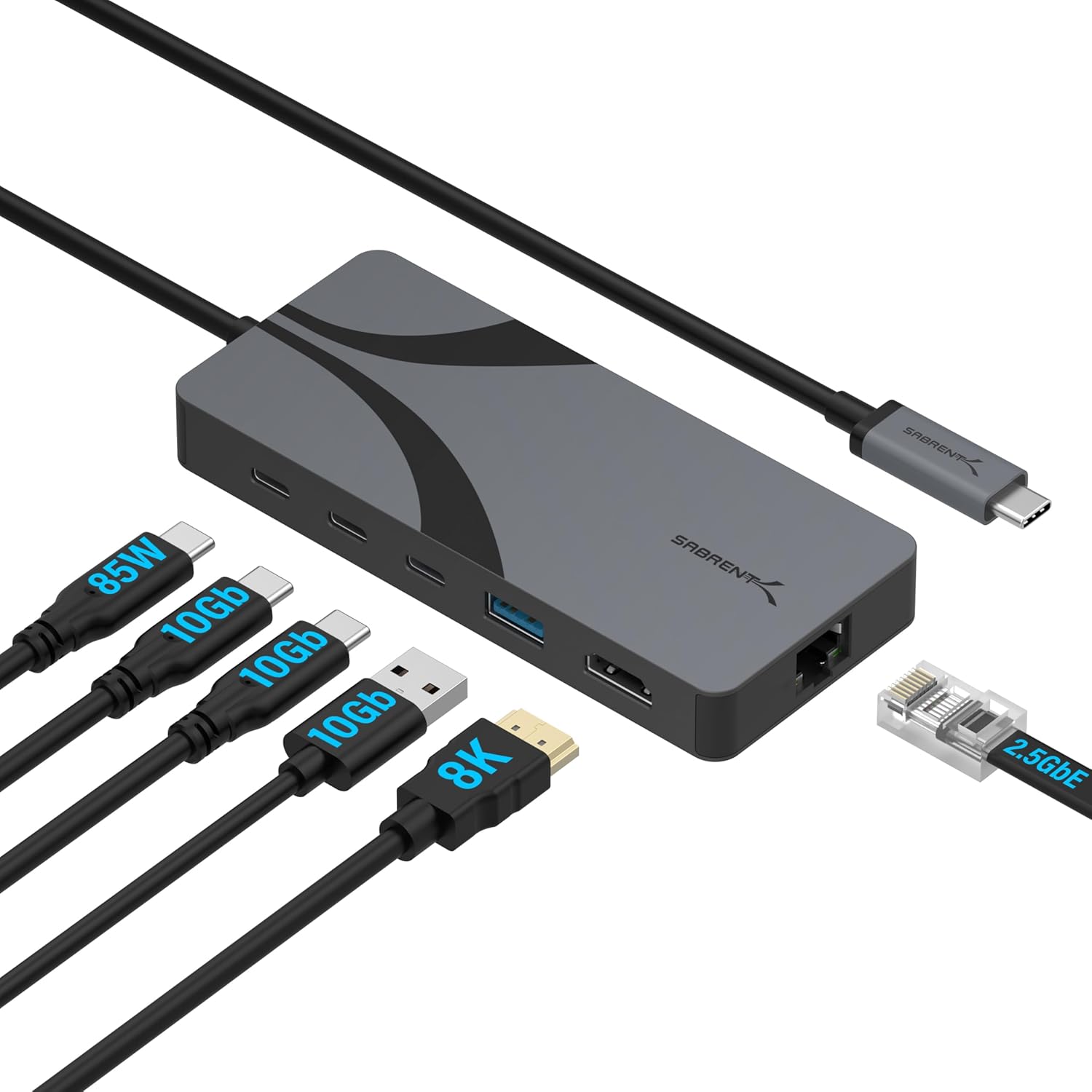
The Sabrent HB-U4HP is the lightest pick here at 3.7 ounces and the cheapest real USB4 hub that made the cut. It keeps the port list short and fast: one HDMI 2.1 output (up to 4K144, or 8K60 with DSC), two 10Gbps USB-C data ports, one 10Gbps USB-A port, a USB-C Power Delivery input for up to 85W of charging, and a 2.5GbE port. The aluminum body and metal port shells are built for bag life, and the USB-C cable is attached.
✓ Pros
- ✓ 2.5GbE wired networking, rare at this size and price
- ✓ HDMI 2.1 handles 4K144 for a fast monitor
- ✓ Lightest and slimmest body in this guide
- ✓ Two 10Gbps USB-C data ports for modern drives and phones
✕ Cons
- ✕ One video output only
- ✕ Charging tops out around 85W
- ✕ No SD card reader
Who it is for: travelers with one monitor at the destination who care about fast wired transfers and a light bag. Who should skip it: anyone who needs two screens from the hub.
Best for HDMI plus DisplayPort: Cable Matters 7-in-1 40Gbps USB4 Hub
The Cable Matters 7-in-1 shares the same tuck-away cable body as the 8-in-1 but swaps the second HDMI for DisplayPort 1.4. That makes it the pick when your office or home monitor only has DisplayPort, or when you want a single 8K60 or 4K240 screen with a high refresh gaming or design panel. It supports two 4K60 screens across HDMI and DisplayPort, offers one 10Gbps USB-C and two 10Gbps USB-A ports, Gigabit Ethernet, and takes 100W in while sending up to 85W to the laptop (up to 15W stays with the hub).
✓ Pros
- ✓ HDMI 2.1 plus DisplayPort 1.4 covers almost any monitor
- ✓ Single 4K240 or 8K60 output for high refresh panels
- ✓ Same pocketable 3.9 x 2.7 x 0.6 inch body with stored cable
- ✓ Clear charging spec: up to 85W to the laptop
✕ Cons
- ✕ Costs noticeably more than the HDMI-only 8-in-1
- ✕ Small number of buyer reviews so far, and a lower average
- ✕ Marketed for Surface, though it works with other USB4 laptops
Who it is for: anyone with a DisplayPort-only monitor or a high refresh panel who still wants a travel-size hub. Who should skip it: buyers who only use HDMI, since the 8-in-1 does that job for less.
Best for a Portable Monitor or Fast SSD: Hagibis USB4 Hub (BD246A)
The Hagibis BD246A is the only pick here with a USB4 downstream port. That port carries 20Gbps data, a DisplayPort 1.4 signal, and 7.5W of power down one USB-C cable, so a USB-C portable monitor or a fast USB4 SSD plugs straight in. Next to it you get HDMI up to 8K60 (or 4K144), four 10Gbps USB ports, and a 100W Power Delivery input that passes up to about 80W to the laptop after the hub takes roughly 20W. Hagibis says Macs that support two external displays can use both outputs, and the maker advertises three screens on Windows. At 4.9 x 2.8 x 0.6 inches and 9.3 ounces, it is the heaviest pick but still bag friendly.
✓ Pros
- ✓ USB4 downstream port drives a USB-C portable monitor with one cable
- ✓ HDMI up to 8K60 or 4K144
- ✓ Four 10Gbps USB ports, more than any other pick
- ✓ Separate video outputs instead of a single split HDMI pair
✕ Cons
- ✕ No Ethernet port
- ✕ Hub keeps about 20W, so roughly 80W reaches the laptop
- ✕ Very few buyer reviews yet, so long-term reliability is unproven
- ✕ Heaviest body in this guide
Who it is for: people who travel with a USB-C portable monitor or a fast external SSD. Use a cable rated for USB4 or Thunderbolt on that downstream port so the monitor gets both video and power; Best Thunderbolt 4 and USB4 Cables in 2026 covers short options. Who should skip it: anyone who needs wired networking at the hotel desk.
Best No-Charger Pick: CalDigit Thunderbolt 3 Mini Dock (Dual HDMI)
The CalDigit Thunderbolt 3 Mini Dock is the outlier: it has no charging input at all. It runs entirely from the laptop's Thunderbolt port, which means one less brick in the bag when you work on battery at a client desk or conference table. It offers two HDMI 2.0 ports for two 4K60 screens, a 5Gbps USB-A port, a USB 2.0 port, and Gigabit Ethernet, all through a built-in 40Gbps Thunderbolt cable, in a 4.88 x 2.55 x 0.74 inch aluminum body.
✓ Pros
- ✓ Bus powered, so no charger or power brick to pack
- ✓ Two HDMI 2.0 outputs sent as separate streams over Thunderbolt
- ✓ Highest buyer rating in this guide across hundreds of reviews
- ✓ Compact aluminum body with attached cable
✕ Cons
- ✕ No laptop charging passthrough, so you need a free port for the charger
- ✕ Older Thunderbolt 3 design with 5Gbps USB-A, not 10Gbps
- ✕ Windows laptops must support two DisplayPort streams over Thunderbolt, and some USB4-only ports skip Thunderbolt 3 support
- ✕ Highest price here, and stock is limited
Who it is for: Thunderbolt laptop owners who want the smallest possible kit and charge separately. Who should skip it: anyone with only one USB-C port, or a USB4 Windows laptop that does not list Thunderbolt 3 compatibility.
Comparison Table
| Pick | Host link | Video outputs | Best single screen | Charging to laptop | Data ports | Ethernet | Size and weight |
|---|---|---|---|---|---|---|---|
| Cable Matters 8-in-1 | USB4 40Gbps | 2x HDMI (2.1 + 2.0) | 8K30 or 4K120 | 100W input | 1x USB-C 10Gbps, 2x USB-A 10Gbps, 1x USB 2.0 | 1GbE | 3.9 x 2.7 x 0.6 in, 4 oz |
| Sabrent HB-U4HP | USB4 40Gbps | 1x HDMI 2.1 | 4K144 or 8K60 (DSC) | Up to 85W | 2x USB-C 10Gbps, 1x USB-A 10Gbps | 2.5GbE | 4.8 x 2.1 x 0.59 in, 3.7 oz |
| Cable Matters 7-in-1 | USB4 40Gbps | HDMI 2.1 + DP 1.4 | 8K60 or 4K240 | Up to 85W | 1x USB-C 10Gbps, 2x USB-A 10Gbps | 1GbE | 3.9 x 2.7 x 0.6 in, 4 oz |
| Hagibis BD246A | USB4 40Gbps | HDMI + USB4 downstream (DP 1.4) | 8K60 or 4K144 | About 80W | 4x USB 10Gbps, 1x USB4 20Gbps | None | 4.9 x 2.8 x 0.6 in, 9.3 oz |
| CalDigit TB3 Mini Dock | Thunderbolt 3 40Gbps | 2x HDMI 2.0 | 4K60 | None | 1x USB-A 5Gbps, 1x USB 2.0 | 1GbE | 4.88 x 2.55 x 0.74 in, 7.4 oz |
The Bottom Line
For most travelers, the Cable Matters 8-in-1 is the one to buy: two HDMI ports, three 10Gbps data ports, Ethernet, and charging in a pocketable body with a stored cable. If you only ever plug into one screen and want faster wired networking, the Sabrent HB-U4HP costs less and weighs less. Choose the Cable Matters 7-in-1 for a DisplayPort monitor, the Hagibis BD246A for a USB-C portable monitor, and the CalDigit Thunderbolt 3 Mini Dock when leaving the charger at home matters more than charging through the hub.
Building out the rest of the bag? See A Travel Tech Kit at Three Budgets, browse the USB-C, docks, and charging hub, and check DisplayPort if your monitor choice depends on the connector.


