



The finished result this kit targets is simple: one small multi-gig switch next to the router, a thin white Ethernet run hugging the baseboard to the far mesh node, a second run to the desk, and a neat surface-mount jack at each end instead of a cable dangling out of a doorway. The mesh node stops relaying your traffic over the air, the desk gets a stable wired link, and nothing is drilled, stapled, or punched into the walls.
This method is written for renters and anyone in an apartment who cannot open walls but can hide a run along baseboards and door frames. It is not a closet rack. If you own the place and want a patch panel, a wall frame, and a shelf, use Home Network Rack Kit: Patch Panel, Switch, and Shelf instead. If you are still deciding whether the router or the radios are the real problem, start with Upgrade Apartment Wi-Fi: What to Replace First.
Why wired backhaul beats wireless mesh hops
A mesh satellite that talks to the router over Wi-Fi has to spend part of its airtime relaying traffic, and that relay shares the air with your phones and laptops. On many systems the hop can cut usable throughput sharply, often around half on a shared band, and it adds latency that shows up on video calls and games. Plug the same satellite into Ethernet and it uses the cable as its link back to the router, which frees its radios to serve devices in that room. Most mesh apps then label the node as wired or Ethernet backhaul.
Ethernet also beats the workarounds in a typical apartment. Powerline depends on your electrical wiring, and MoCA needs coax outlets in the right rooms, which many apartments do not have. The tradeoffs are covered in Powerline vs MoCA vs Mesh: How to Get Internet to the Far Side of the House and the MoCA explainer. When you can physically route a cable, a cable wins.
What You Need
This is one compatible renter kit, not a mix-and-match catalog. Every piece is pre-terminated or tool-free. You need a tape measure, scissors or a fine-tooth saw for trimming raceway, isopropyl wipes, and painter's tape for dry fitting.
Switch
A five-port fanless 2.5G switch is enough for the router uplink, the mesh node run, the desk run, a console or TV, and one spare. Its ports run at 1G or 2.5G, so it helps today with gigabit gear and keeps paying off when the router, node, or desk machine gets a 2.5G port. Compare alternatives in Best 2.5GbE Unmanaged Switches Under $100 in 2026.
Long flat run
A 50 ft flat Cat 6 cable with factory plugs on both ends is the renter-friendly long run. It is thin enough to tuck along the baseboard edge, slide under a rug, or fit inside a small raceway, and the listing specifies 100% bare copper. Buy one per destination: one for the mesh node, one for the desk if it sits in another room. If you need a longer or heavier run, the round options in Best Ethernet Cables: Cat6 vs Cat6a for a Home Network are better, and the Cat6a page explains when the thicker cable earns its place.
Adhesive raceway
The CordMate II kit gives you 12 ft of paintable, hinged channel with peel-and-stick backing plus elbows, couplings, and a T fitting. Use it where the cable crosses open wall, climbs a door frame, or turns a corner in plain sight. The hinged lid lets you add the second run later without peeling anything off.
Surface jacks
These two-port boxes accept standard keystone inserts and mount with screws or the included double-stick tape. Tape is the renter move: a box on the baseboard or the side of a desk gives the run a clean, strain-relieved end instead of a loose plug on the floor. The ten-pack is far more than you need, which leaves spares for a future room.
Keystone couplers
A keystone coupler is a female-to-female RJ45 jack that snaps into the surface box. The flat run plugs into the back, a patch lead plugs into the front, and you skip punch-down termination entirely. That is the whole trick that makes this kit tool-free.
Patch leads
Short Cat 6 leads connect the router to the switch, the surface jack to the mesh node, and the desk jack to your computer. Five 10 ft cables cover every hop in this kit with one spare.
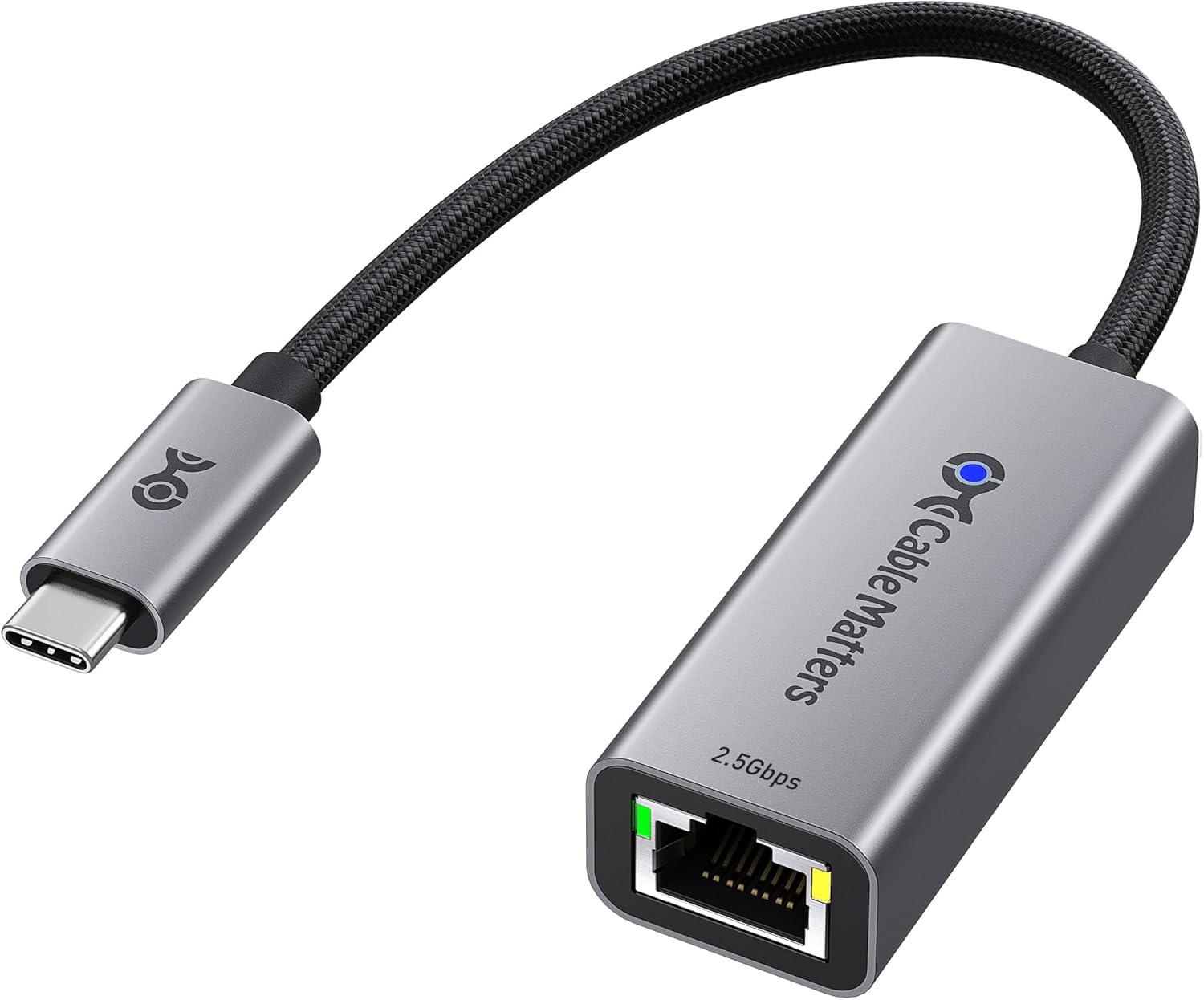
Desk NIC
Most thin laptops have no Ethernet port at all. This USB-C adapter adds a 2.5G RJ45 port and falls back to 1G or 100M on older gear. Desktop users with a built-in port can skip it. More options are in Best 2.5GbE USB-C Ethernet Adapters for Laptops and Docks in 2026.
What It Costs
About $170 as of writing for the full kit with one 50 ft run, and roughly $10 more for a second flat run to the desk. Prices move with Amazon deals, so treat that as a ballpark rather than a fixed cart total. Skip the USB-C adapter if your desk machine already has an Ethernet port, and skip the raceway if every stretch of the route already hides behind furniture.
Step-by-Step Setup
- Plan the route before buying extra cable. Walk from the router to the mesh node spot and to the desk, measuring along baseboards and around door frames rather than straight across the floor. Add about 10% for corners and slack. Confirm the mesh satellite actually has an Ethernet port that supports wired backhaul.
- Place the TRENDnet TEG-S350 next to the router and connect a router LAN port to any switch port with one 10 ft Cat 6 lead. If your router has a 2.5G LAN port, use it for this uplink.
- Dry fit the run. Lay the Jadaol flat Cat 6 along the route and hold it with painter's tape. Tuck it into the gap where carpet meets baseboard where you can, and go around door casings instead of under a door that will pinch it every day.
- Cover the exposed stretches. Wipe the surface with isopropyl, cut the CordMate II channel to length, snap the cable in, and press the adhesive firmly. Use the kit's elbows at corners so the cable never folds sharply. Prefer glossy baseboard or trim over flat wall paint, since adhesive releases more cleanly from trim.
- Terminate without tools. Snap a keystone coupler into a surface mount box, plug the flat run into the back, close the box, and stick it to the baseboard near the mesh node. Repeat at the desk end. If you would rather not use boxes, a coupler alone joins the flat run to a patch lead, but the box protects the joint from feet and vacuums.
- Connect the mesh node. Patch from the surface jack into the node's Ethernet port, then reboot the node or wait a few minutes. Check the mesh app; most label the node as wired or Ethernet backhaul once it sees the cable.
- Set up the desk drop. Patch from the desk jack into the computer, or into the Cable Matters 2.5Gb USB-C adapter on a laptop. Read more about the speed tier in the 2.5GbE explainer and the full desk build in Run 2.5GbE to the Desk: Everything You Need.
- Test the link. On Windows, open Settings, Network, Ethernet and read the link speed. On a Mac, open System Settings, Network, Ethernet, Details, Hardware. You want 1 Gbps or 2.5 Gbps. Anything at 100 Mbps usually means a bad plug, a crushed spot, or a coupler that is not fully seated. Then run a speed test from the desk and from a device near the mesh node.
- Label and document. Put a small label on each end of each run and snap a phone photo of the route. That photo is your move-out map.
Renter Cleanup at Move-Out
Unplug the runs and lift them out of the open raceway first. Warm each raceway strip and surface box with a hair dryer for 20 to 30 seconds, then peel slowly at a low angle, close to the wall. Roll off leftover adhesive with your thumb or a little adhesive remover tested in a hidden spot. If a fleck of paint lifts, a dab of matching touch-up paint usually covers it. Everything in this kit except the adhesive strips is reusable in your next place.
If your building has an existing low-voltage plate, such as an old phone jack with an empty box behind it, ask the landlord before using it. With permission, a fish tape can pull a run through that existing opening into a neighboring closet. Do not cut new holes or fish through walls without written approval.
Mistakes to Avoid
Bottom line
For an apartment where you cannot open walls, a small 2.5G switch by the router, a flat copper run along the baseboard, adhesive raceway for exposed stretches, and taped-on surface jacks with keystone couplers is the complete wired backhaul kit. It frees the mesh node's radios, gives the desk a stable link, and comes off cleanly when you move. Use the rack kit when you own the walls and want a patch panel.
Read next
- Home Network Rack Kit: Patch Panel, Switch, and Shelf
- Best 2.5GbE Unmanaged Switches Under $100 in 2026
- Best Ethernet Cables: Cat6 vs Cat6a for a Home Network
- Best 2.5GbE USB-C Ethernet Adapters for Laptops and Docks in 2026
- Upgrade Apartment Wi-Fi: What to Replace First
- Powerline vs MoCA vs Mesh: How to Get Internet to the Far Side of the House


