



The room farthest from your router is always the problem room. Maybe it's a converted garage, a bedroom over the kitchen, or a basement office two floors down from the modem. You've got three real options for fixing it: powerline adapters that use your electrical wiring, MoCA adapters that use your cable TV coax, or mesh WiFi that skips wiring entirely. Most comparison articles list generic pros and cons for all three and leave you to guess. The faster path is to look at what's already in your walls first, because that alone rules out one or two of the three before you spend a dollar.
Start with what's already in your walls
The fastest way to pick a technology is to check your wiring before you check specs. This is the step every buying guide skips, and it's the one that actually determines whether your fix works on the first try.
| What's in the far room | Best fix | Why |
|---|---|---|
| A working cable TV or old cable-internet coax outlet | MoCA | Rides the shielded coax, holds close to its full rated speed |
| No coax, but the room shares your home's main electrical panel | Powerline | Cheapest wired jack, works over existing outlets |
| No coax, different electrical panel or sub-panel, or split-phase wiring | Mesh WiFi | Wiring-dependent options aren't reliable here |
| Detached structure (garage, shed, guest house) | Mesh with a wired or outdoor backhaul | None of the wired technologies cross a real air gap |
If you're not sure whether a room is on the same panel, check your breaker box: rooms fed by different panels or by different legs of a split-phase panel are the single most common reason powerline adapters mysteriously fail to pair or crawl to unusable speeds.
MoCA: the wired backbone hiding in your coax
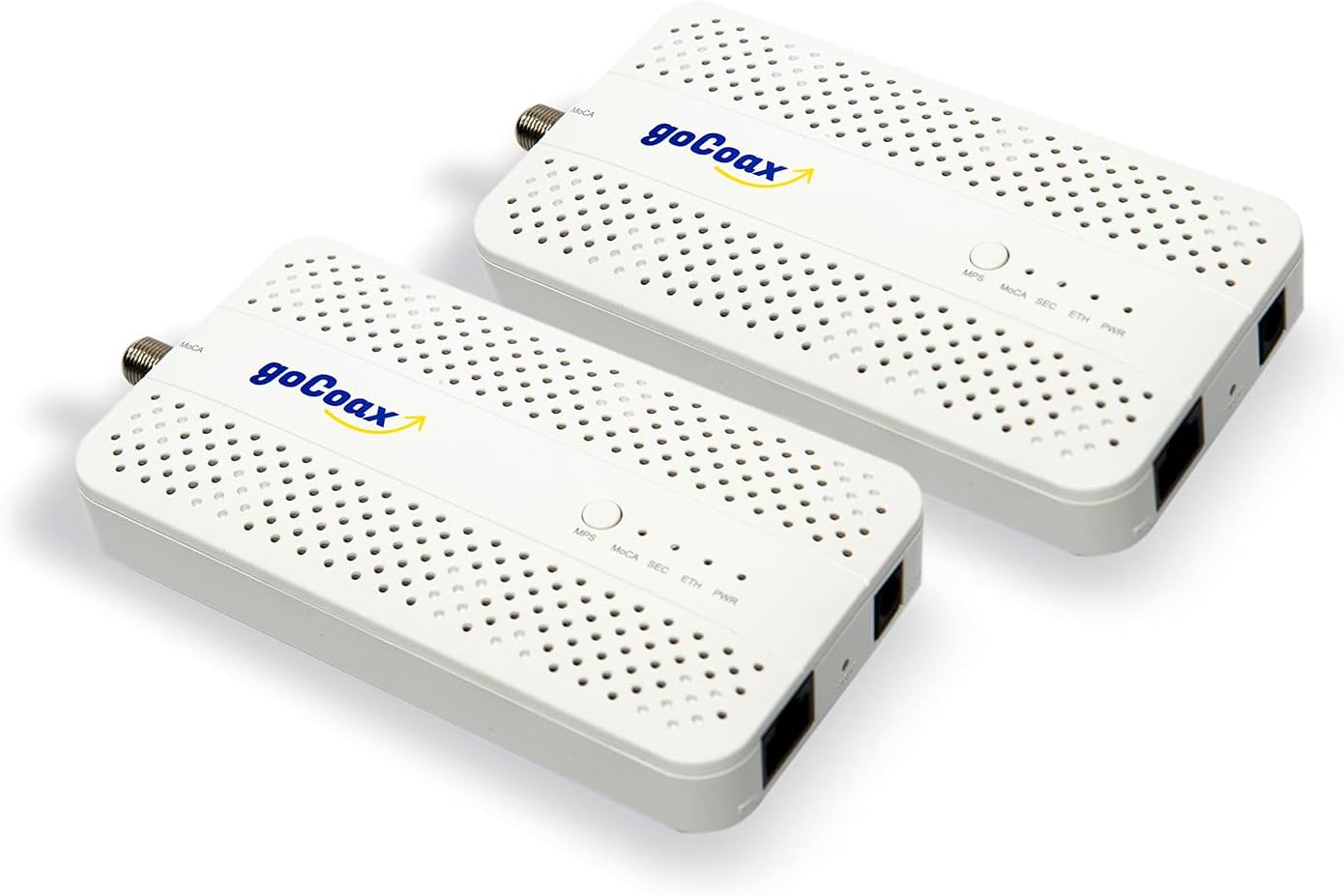
MoCA turns unused cable TV wiring into a full wired Ethernet backbone, and it's the closest thing to running new Ethernet without opening a wall. The goCoax MoCA 2.5 Adapter (2-Pack) is a good example of why it wins on pure performance: it's rated for the full 2.5Gbps on its port, and because coax is shielded, MoCA holds much closer to that rated number than powerline does, with latency reviewers clock at under 3ms.
Two things people don't find out until they've already bought a splitter:
- You need a MoCA-rated splitter (1125 to 1675MHz passband) somewhere in the run. A generic hardware-store splitter will throttle the connection, and this is the complaint that shows up most in setup threads.
- You don't need an active cable or internet subscription on that coax line. MoCA rides the coax independently of any cable signal; a separate point-of-entry PoE filter is the recommended extra step to keep the MoCA signal off your ISP's line, and it's the part that's easiest to forget.
At about $119.99 for the pair (4.6 stars), the goCoax kit includes coax cables, Ethernet cables, and power adapters, so a basic two-adapter run needs nothing else. Pairing is a single MPS button, no app required. It also scales to 16 nodes on one MoCA network if you eventually want more than one wired point. The tradeoffs: it explicitly isn't built for satellite-TV coax setups with multiswitch or diplexer wiring, and if any older MoCA 1.x or 2.0 device shares the same coax network, it drags the whole link down to that device's speed.
Powerline: cheapest fix, if your panel cooperates
Powerline is the simplest and cheapest of the three, and the TP-Link AV1000 Powerline Starter Kit at about $54.99 is a fair representative: plug one adapter in near your router, the other near the far-room device, and it pairs with no app or configuration screen. That simplicity is real. What's not real is the AV1000 number on the box.
Powerline adapters need to be on the same electrical circuit or, at minimum, the same breaker panel to work reliably. TP-Link's own support guidance puts realistic throughput at 20 to 35 percent of the rated 1000 Mbps, and users on TP-Link's community forum report speeds as low as 30 to 180 Mbps depending on the wiring in between. One user traced a slowdown directly to overhead halogen lamps sharing the same circuit; dimmers and other devices measurably degrade the signal too. Homes with two electrical panels, an addition, or older split-phase wiring often can't bridge the adapters reliably at all, which rules powerline out for garages, additions, and detached structures the same way it rules out satellite coax for MoCA.
So no, a powerline adapter is not as fast as a real Ethernet run, and it isn't trying to be. It's a fix for one wired point (a TV, console, or desktop) in a home with straightforward single-panel wiring, not a backbone to build a whole network on. It does have a passthrough AC socket rated to 15A so you don't lose the outlet, and standby draw is under 1W. At under $55 it's the cheapest way to get one wired jack working today.
Mesh WiFi: no wiring required, coverage over raw speed
If the far room has neither coax nor a shared panel, or it's a detached structure, mesh is the only option that doesn't depend on your house's existing wiring. The TP-Link Deco X60 3-Pack (about $149.99, 4.4 stars) is rated for up to 7,000 square feet across three units and supports 150+ connected devices with OFDMA and MU-MIMO, which matters more than it sounds once you count smart-home devices.
Yes, mesh needs wired backhaul to hit its real speed. The Deco X60 has no dedicated wireless backhaul band, so run fully wireless, the same 5GHz radio carries both client traffic and inter-node backhaul. Independent reviewers at Dong Knows Tech and Android Central clocked real-world speeds behind some older Wi-Fi 5 mesh systems when it ran fully wireless. That's why the far room being slow with mesh is so often a backhaul problem, not a mesh problem: each node has 2 Gigabit Ethernet ports, and running a wired or MoCA connection to the farthest node closes most of that gap. Treat TP-Link's 7,000 square foot claim skeptically too; reviewers suggest budgeting for closer to 5,000 in a typical multi-wall home.
Side by side
| Attribute | goCoax MoCA 2.5 Adapter (2-Pack), MA2500D | TP-Link AV1000 Powerline Ethernet Adapter Starter Kit, TL-PA7017P KIT | TP-Link Deco X60 WiFi 6 AX3000 Whole-Home Mesh Wi-Fi System, 3-Pack |
|---|---|---|---|
| Rating | 4.6 | 4.4 | 4.4 |
| Price | Not listed | Not listed | Not listed |
| Standard | MoCA 2.5, up to 2.5Gbps real traffic throughput | HomePlug AV2, rated AV1000 (up to 1000 Mbps) | Not listed |
| Ports | 1x 2.5GbE RJ45 LAN port + 1x coax (F-connector) per unit | 1x Gigabit Ethernet port per adapter | 2x Gigabit Ethernet per unit (WAN/LAN auto-sensing) |
| Channel bonding | Up to 5 channels bonded | Not listed | Not listed |
| Network size | Up to 16 nodes per MoCA network | Not listed | Not listed |
| Mounting | Wall or desk mount | Not listed | Not listed |
| Kit contents | 2 adapters, coax cables, Ethernet cables, power adapters | 2 adapters + 2 Ethernet cables | Not listed |
| Passthrough socket | Not listed | Integrated AC socket, rated up to 15A | Not listed |
| Dimensions | Not listed | 2.3 x 1.7 x 3.7 in (58 x 42 x 95 mm) per unit | 4.33 x 4.33 x 4.49 in (110 x 110 x 114 mm) per unit |
| Rated range | Not listed | Up to 300 m / 1,000 ft over electrical circuit | Not listed |
| Power draw | Not listed | 2.54W max, 0.83W standby | Not listed |
| Encryption | Not listed | 128-bit AES | Not listed |
| WiFi standard | Not listed | Not listed | Wi-Fi 6 (802.11ax), dual-band AX3000 |
| Speed | Not listed | Not listed | 2,402 Mbps (5GHz) + 574 Mbps (2.4GHz) |
| Coverage (3-pack, mfr.) | Not listed | Not listed | Up to 7,000 sq ft |
| Device support | Not listed | Not listed | 150+ devices |
| Antennas / streams | Not listed | Not listed | 4 internal antennas per unit, 6 spatial streams |
| Buy | View on Amazon | View on Amazon | View on Amazon |
✓ Pros
- ✓ MoCA holds closest to its rated speed of the three wired options, with sub-3ms latency
- ✓ Works independently of any cable or internet subscription on that coax line
- ✓ Scales to 16 nodes if you want more than one wired point later
✕ Cons
- ✕ Requires a MoCA-rated splitter, a part that's easy to buy wrong the first time
- ✕ A separate PoE filter at the point of entry is a step people skip and then troubleshoot for hours
- ✕ Not built for satellite-dish coax wiring with multiswitches
Can you combine MoCA, powerline, and mesh?
Yes, and this is often the actual best answer rather than picking just one. MoCA and mesh combine especially well: run a MoCA connection to the far corner of the house, plug a mesh node's Ethernet port into it, and that node now has a wired backhaul instead of a wireless hop, closing most of the performance gap described above. MoCA and powerline can technically coexist on the same network since they use entirely different physical wiring, but stacking both rarely helps; pick whichever one your coax or panel wiring supports and use the other only if the first genuinely won't reach.
How many adapters can you run on one network? MoCA supports up to 16 nodes per coax network, which is more than most houses will ever need. Powerline kits are typically sold in pairs but most brands support additional adapters on the same electrical wiring, within the same same-circuit caveat above.
Detached garage or shed
None of the wired-through-your-house options cross a real air gap to a detached structure. If the garage or shed has its own coax or is on the same panel as the house (some are, many aren't), MoCA or powerline can still work as a bridge to a mesh node placed there. Otherwise you're looking at a mesh system with an outdoor-rated add-on unit, or a dedicated point-to-point wireless bridge, which is enough of its own topic that it deserves separate coverage rather than a paragraph here.
Gaming and PS5 latency
For gaming, wire the console directly into whichever backbone you choose; the wireless "last hop" is always the highest-latency link regardless of technology. MoCA's sub-3ms latency over coax makes it the strongest backbone for a wired PS5 or PC setup. Powerline latency is more variable and tracks directly with how noisy your electrical circuit is. Mesh alone, over WiFi, will always add more latency than either wired option; if you're chasing PS5 latency specifically, run an Ethernet cable from the nearest mesh node to the console rather than relying on WiFi for that final stretch. If you're also expanding console storage while you're at it, that's a separate purchase from anything on this page.
How to set it up
- Check the far room's wiring. Look for a coax outlet (cable TV jack) and check your breaker panel to see if the room shares the same panel as your router's location.
- Match the technology to the wiring. Coax present: MoCA. No coax, same panel: powerline. Neither, or detached: mesh.
- For MoCA, confirm any splitter in the coax path is MoCA-rated (1125 to 1675MHz), and add a point-of-entry PoE filter if your MoCA vendor recommends one.
- For powerline, plug the first adapter directly into a wall outlet (not a power strip) near the router, and the second directly into a wall outlet in the far room.
- For mesh, place the farthest node roughly halfway between the previous node and the dead zone, and connect it via Ethernet or MoCA if any wired path is available.
- Test speed at the actual point of use, not standing next to the adapter, and compare it against your ISP plan speed before deciding it's "good enough."
- If speeds disappoint, check for a shared circuit issue (powerline), a non-MoCA splitter (MoCA), or a wireless-only backhaul (mesh) before assuming the hardware is broken.
Whichever route you land on, the room that ends up wired is a good candidate for more than just WiFi. If it becomes a home office, a docking station at that desk is worth pairing with the new jack, and if you're routing a stable wired connection back there anyway, it's also the right spot for network storage if backups or media are part of the plan.

