




A small wall-mount open frame, a punched Cat 6 patch panel, a Gigabit switch on a vented shelf, and short patch leads from panel to switch is the finished result this kit targets. Structured cable lands once on the panel. The switch stays dressed and reachable. Spare U-space waits for a UPS, modem shelf, or future PoE box.
This method is a closet rack BOM, not a Wi-Fi cart and not a hypervisor lab. For router plus EasyMesh plus backbone cable, use First-Time Home Wi-Fi Upgrade Kit (Router + Mesh Node + Ethernet). For a Proxmox host, multi-gig switch, and USB DAS, use Proxmox Home Lab Starter Kit: Host, Switch, and Storage. For apartment triage order, start at Upgrade Apartment Wi-Fi. Who it is for: homeowners and renters who already have (or will fish) Cat 6 runs and want a wall rack that beats a floating switch under the desk.
What You Need
This is one compatible first home rack kit, not a mix-and-match catalog. The open frame is shallow (about 12 in) on purpose so switches, panels, and shelves fit a closet without buying a data-center cabinet. Bring a punch-down tool (110-style), stud finder, level, and lag screws rated for the wall and load.
Wall-mount open frame (12U)
A 2-post 12U EIA-310 open frame with 12 in depth and roughly 200 lb capacity when stud-mounted. Open frame keeps airflow and rear access simple for a first rack. Leave several U empty after the panel, shelf, and switch so the kit can grow.
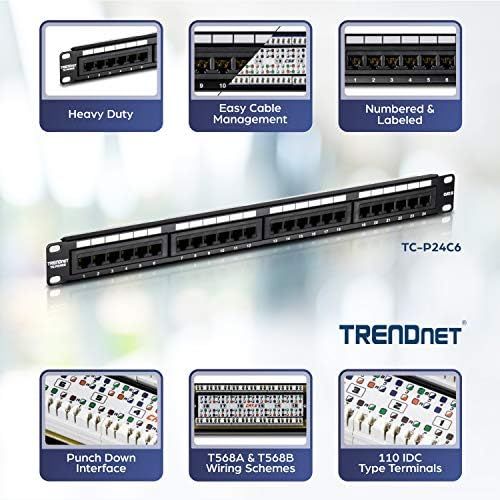
24-port Cat 6 patch panel
A loaded 24-port Cat 6 punch-down panel (1U) so every structured run terminates once. Label ports to room names. Stop re-terminating the switch every time a room moves. Compatible with Cat 5e and Cat 6 house cable for Gigabit and most 2.5G desk upgrades.
Gigabit unmanaged switch
The TL-SG108 is the cheap always-on 8-port Gigabit spine for this first rack. Unmanaged on purpose: patch labeled panel ports into the switch and leave VLANs for a later managed upgrade. When multi-gig desks matter more, step to the switch shortlist at Best Ethernet Switches for a Faster Home Network or the desk path at Run 2.5GbE to the Desk: Everything You Need.
1U vented shelf
A 10 in deep vented cantilever shelf gives the SG108 (and a modem or small UPS brick later) a flat home instead of hanging from one RJ45. Mount it a couple of U below the panel so short patches stay neat.
Short Cat 6 patch pack (panel to switch)
A 1 ft five-pack dresses panel ports into the SG108 without coils of slack. Use longer Cat 6 only for modem-to-router, router-to-switch uplink from another room, or temporary desk drops. Color or label both ends if several ports stay live.
What It Costs
About $215 as of writing for the core kit (12U open frame + 24-port Cat 6 panel + TL-SG108 + 1U shelf + 1 ft Cat 6 five-pack). Street prices swing with Amazon deals; treat that as a ballpark, not a locked cart total. Budget punch-down tool, lag hardware, and a longer Cat 6 pack separately if rooms still need temporary drops. Skip a glass-door 9U cabinet on day one unless you need a lockable enclosure more than open access.
Step-by-Step Setup
- Pick a closet or utility wall with studs on 16 in centers, clear of HVAC returns. Dry-fit the StarTech 12U frame, mark lag holes into studs (not drywall anchors alone), and mount level before hanging gear.
- Rack the TRENDnet Cat 6 panel near the top. Dress house cable with a service loop and strain relief. Punch T568B (or match whatever the house already uses) and label every port to a room.
- Install the 1U vented shelf a few U below the panel. Place the TL-SG108 on the shelf and feed it power from a surge strip or future UPS, not from a dangling brick behind drywall.
- Patch active panel ports into the SG108 with the 1 ft Cat 6 pack. Uplink one SG108 port toward the router or modem LAN. Leave unused panel ports undressed until those rooms are live.
- Smoke-test: link lights on patched ports, a wired speed test in a far room, and a quick re-seat of any flaky punch. Document port map on a label inside the rack.
- Reserve empty U below for a compact UPS, cable management bar, or deeper switch later. Do not fill the frame on day one just because the U count is there.
Mistakes to Avoid
Bottom line
For a first home network rack that is not a Wi-Fi upgrade kit and not a Proxmox lab, the StarTech 12U open frame, TRENDnet 24-port Cat 6 panel, TL-SG108 on a 1U vented shelf, and short Cat 6 patches is the complete closet BOM. Use the Wi-Fi upgrade kit when radios are still the bottleneck, and the Proxmox kit when compute is the goal.


