




An Elgato Stream Deck is the reference point for desk shortcuts: a grid of small LCD keys that each show an icon and fire an action, like switching an OBS scene, muting a mic, or launching a macro. It is a great device, but it is not the only way to get one-tap control, and a Deck is weak at one job many creators care about: turning things. Volume, timeline scrubbing, brush size, and exposure sliders want a dial, not a button. This guide covers the alternatives that are actually listed and buyable on Amazon US right now, from budget LCD-key pads to dial-heavy consoles built for editors. If you are choosing between two Elgato models instead, read Elgato Stream Deck MK.2 vs Stream Deck Neo first.
Why Look Past a Stream Deck
A Stream Deck does three things well: it shows you what each key does, it runs multi-step actions, and it has a huge plugin library. The alternatives below compete on different axes.
Price. Budget LCD-key pads now copy the Deck layout for much less money. The tradeoff is a smaller software ecosystem and fewer years of track record.
Dials and knobs. Rotary controls are the biggest gap on a standard Deck. A dial lets you ride audio levels during a stream, scrub a timeline, or nudge a color wheel without dragging a mouse.
Editing focus. Editors live in Premiere Pro, DaVinci Resolve, Final Cut Pro, Lightroom, and Photoshop. Consoles built for those apps put wheels and modifier buttons under one hand so the other stays on the mouse or pen.
One less box on the desk. Some newer controllers fold USB ports, HDMI out, and a card reader into the same chassis, which matters on a crowded streaming desk.
What to Look For
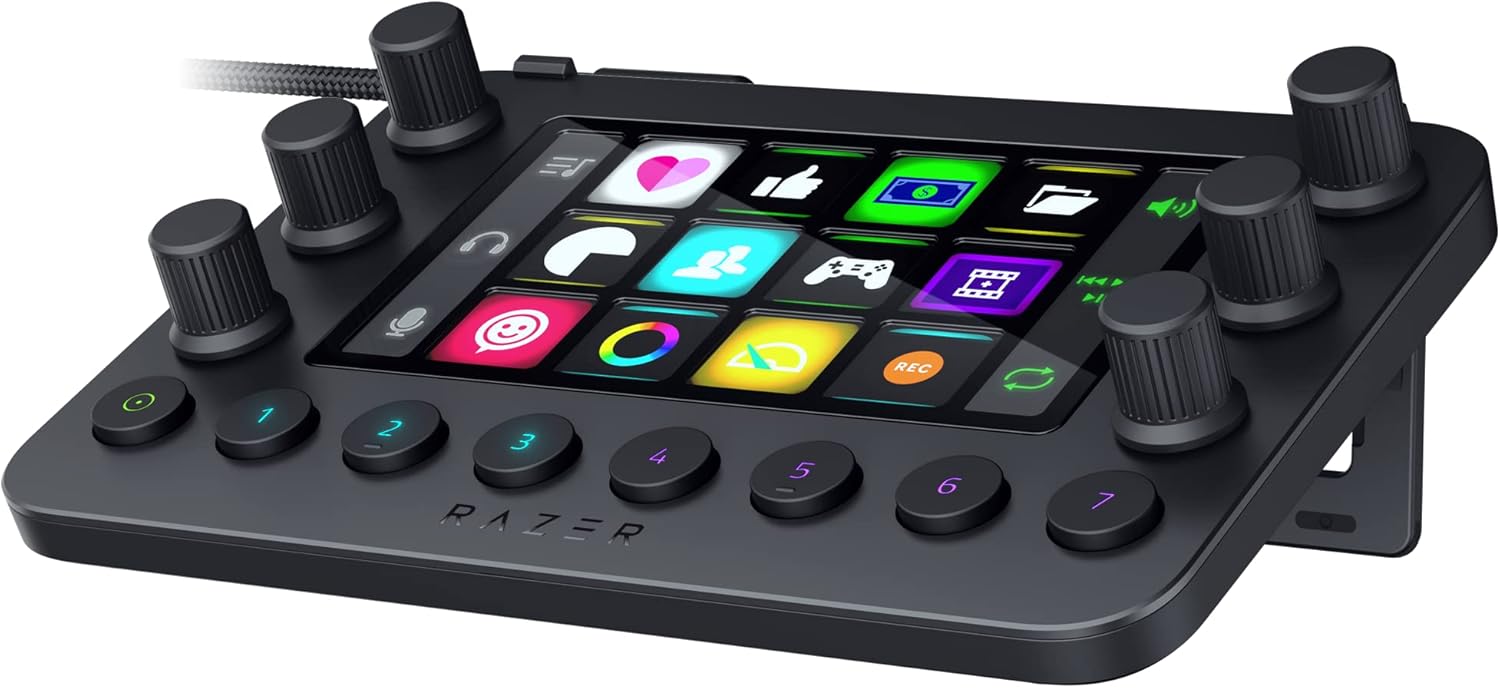
Key type. LCD keys show custom icons per page and per app. Plain mechanical keys are cheaper and more tactile but need labels or memory. Touch keys on a single screen (Razer) behave like LCD keys with haptic feedback instead of a physical click.
Dials, knobs, and wheels. Count them and check what the software lets each one control. Three knobs is plenty for mic, game, and music levels. Editors usually want at least one large dial plus a scroll wheel.
Software and integrations. This is where most of the value lives. Check for ready-made profiles in the apps you use: OBS Studio, Streamlabs, Twitch, Discord, Spotify, Premiere Pro, DaVinci Resolve, Final Cut Pro, Lightroom, and Photoshop. Vendor app lists are claims, so verify your specific app is on the list before you buy.
OS support. Every pick here lists Windows and macOS. The TourBox Elite Plus also lists iPadOS. None of the vendors list native Linux support, so Linux streamers should look elsewhere.
Connection. Wired USB-C is simplest for a fixed desk. Wireless (TourBox, and the MX Creative Console dialpad) frees up cable runs but adds batteries.
Best Overall: VSD M18
The VSD M18 is the closest thing to a Stream Deck layout for about $55. VSDinside lists 15 LCD keys plus 3 physical buttons, so you get 18 programmable inputs with custom images (JPG, PNG, and animated GIF per the listing). Each key can run a single action or a multi-step sequence, and the listing calls out OBS scene switching, Streamlabs, YouTube, Discord, media control, app launching, and text input. It connects over USB-C and lists Windows 11 and macOS 11 or newer; the vendor says native Linux is not supported. An RGB light ring around the edge is a looks feature, not a function.
What makes it the overall pick is the combination of a familiar 15-key grid, a price far below an Elgato Deck, and a strong rating (about 4.4 stars across 700+ reviews). It has no dials, so it does not solve the turning problem.
✓ Pros
- ✓ 15 LCD keys plus 3 physical buttons for about $55
- ✓ Custom images and animated GIFs on each key
- ✓ Strong rating across a large review count
✕ Cons
- ✕ No dials or knobs
- ✕ Smaller plugin ecosystem than Elgato
- ✕ No native Linux support
Who it is for: streamers who want a Deck-style grid on a budget. Who should skip it: anyone who needs dials for audio or editing (Ulanzi D200X or Razer).
Best With Knobs: Ulanzi D200X
The Ulanzi D200X adds what a Deck lacks: three knobs next to 14 LCD keys, plus 2 physical page-turn keys. Ulanzi says the knobs handle volume, brightness, and timeline adjustments, and the listing names OBS, Twitch, YouTube, Discord, Premiere Pro, Final Cut Pro, DaVinci Resolve, CapCut, Photoshop, and Lightroom support through the free Ulanzi Studio app. It also works in an offline mode for basic use.
The other twist is a built-in 8-in-1 USB-C hub: 4K HDMI out, a 10Gbps USB 3.2 port, SD and microSD readers, a 3.5mm audio jack, and 100W USB-C power passthrough, per the listing. That can replace a separate dongle on a laptop desk. It runs on Windows and macOS in an anodized aluminum body for about $100.
✓ Pros
- ✓ 14 LCD keys plus 3 knobs for audio and timeline control
- ✓ Built-in HDMI, USB 3.2, card readers, and 100W passthrough
- ✓ Free Ulanzi Studio software with no subscription
✕ Cons
- ✕ Rating (about 4.0) trails the VSD M18 on a smaller review base
- ✕ Newer product with a shorter track record
- ✕ Hub features add bulk if you only want keys
Best for laptop streamers who want knobs and a port expander in one box. Skip if your desktop already has plenty of ports and you only need keys (VSD M18).
Best All-in-One Streaming Console: Razer Stream Controller
The Razer Stream Controller packs the most controls on this list into one console: 12 haptic Switchblade keys on an LCD touchscreen, 6 tactile analog dials, and 8 programmable buttons that can flip between key layouts. Razer lists integrated support for OBS Studio, Streamlabs, Twitch, Discord, Spotify, Lightroom Classic, Photoshop, Premiere Pro, After Effects, Illustrator, and Final Cut Pro, with a dynamic mode that swaps profiles based on the active app. It works with Windows and macOS for about $150.
The catch is software. The Stream Controller runs on the Loupedeck app (Loupedeck is now part of Logitech). In May 2026 Loupedeck announced it would drop Razer support, then reversed that in August 2026 and restored support in version 6.4.1. It works today, but the path has been bumpier than on the other picks.
✓ Pros
- ✓ 12 touch keys, 6 dials, and 8 buttons in one console
- ✓ Haptic feedback on the key surface
- ✓ Wide list of streaming and Adobe integrations
✕ Cons
- ✕ Depends on the Loupedeck app, which briefly planned to drop Razer support
- ✕ Some older Razer plugins need a legacy Loupedeck version
- ✕ Larger footprint than a key-only pad
Buy this if you want keys and six dials on one surface for live audio mixing and scene control. Skip if long-term software certainty matters most (Logitech MX Creative Console).
Best for Adobe and Creative Apps: Logitech MX Creative Console
The Logitech MX Creative Console is Logitech's own take on the Loupedeck idea, split into two pieces: a keypad with 9 customizable LCD keys and a separate dialpad with a low-friction dial and a roller. Logitech lists integrations for Photoshop, Premiere Pro, Illustrator, Lightroom and Lightroom Classic, Final Cut Pro, Figma, DaVinci Resolve, Spotify, and Zoom, with up to 15 keypad pages per profile and support for your own icons. It runs through Logi Options+ on Windows and macOS, the keypad stand is included, and the listing includes a 3-month Adobe Creative Cloud offer.
At about $170 it costs more than a key-only pad, and its rating (about 4.1) is the lowest on this list. The split design is the selling point: put the keypad above your keyboard and the dialpad next to your mouse hand.
✓ Pros
- ✓ Separate keypad and dialpad you can place independently
- ✓ First-party Logitech software with Adobe, DaVinci, and Final Cut profiles
- ✓ Includes a keypad stand and a Creative Cloud trial offer
✕ Cons
- ✕ Only 9 LCD keys per page
- ✕ Rating trails the other picks
- ✕ Streaming integrations are less prominent than the creative app list
Best for photo, design, and video creators already in Logitech's MX ecosystem. Skip if your main job is running a live stream (Razer or Ulanzi).
Best for Video and Photo Editors: TourBox Elite Plus
The TourBox Elite Plus is not a Deck clone at all. It is a one-hand controller with a knob, a scroll wheel, a dial, and a cluster of buttons shaped for muscle memory, so your other hand stays on the mouse or pen. TourBox lists native integration with Photoshop, Lightroom, Premiere Pro, Procreate, LumaFusion, Final Cut Pro, and DaVinci Resolve, plus plugin support for Capture One, Affinity, Illustrator, CapCut, and OBS. It connects over Bluetooth, runs on 2 AA batteries, and is the only pick here that also lists iPadOS alongside macOS and Windows.
It is the priciest option here, near $300 for this color, and it has no screen or labeled keys, so expect a learning period. Its rating (about 4.6) is the highest on this list.
✓ Pros
- ✓ Knob, scroll wheel, and dial built for timeline and brush control
- ✓ Works with iPadOS as well as macOS and Windows
- ✓ Highest rating on this list
✕ Cons
- ✕ Most expensive pick, near $300 for this color
- ✕ No LCD keys or icons to show what each control does
- ✕ Less suited to live stream scene switching than a key grid
Buy this if editing, color grading, or digital painting is the main workload. Skip if you mostly need visible buttons for a live show (VSD M18 or Ulanzi D200X).
Comparison
| Model | Type | Keys | Dials | Connection | OS (vendor listed) | Street |
|---|---|---|---|---|---|---|
| VSD M18 | LCD key pad | 15 LCD + 3 buttons | None | USB-C | Windows, macOS | ~$55 |
| Ulanzi D200X | LCD keys + knobs | 14 LCD + 2 page keys | 3 knobs | USB-C, built-in hub | Windows, macOS | ~$100 |
| Razer Stream Controller | Touch keys + dials | 12 touch keys + 8 buttons | 6 dials | USB-C | Windows, macOS | ~$150 |
| Logitech MX Creative Console | Keypad + dialpad | 9 LCD keys | Dial + roller | Keypad wired, dialpad wireless | Windows, macOS | ~$170 |
| TourBox Elite Plus | Editing controller | Shortcut buttons | Knob, wheel, dial | Bluetooth | Windows, macOS, iPadOS | ~$297 |
How to Choose
Start with the job. If you run a live show and mostly press things (scenes, mute, sound effects, chat commands), a key grid is the right shape, and the VSD M18 gets you there cheapest. If you also ride audio levels live, step up to knobs on the Ulanzi D200X or six dials on the Razer Stream Controller.
If you edit more than you stream, dials matter more than keys. The Logitech MX Creative Console suits Adobe-heavy photo and design work with labeled keys plus a dial. The TourBox Elite Plus suits long timeline and painting sessions where your hand never leaves the controller.
Then sanity check the rest of the desk. Keys only help if your camera, lights, and mic are already solid; see the Creator Desk at $800: Camera Buy Order, the YouTube Talking-Head Light Kit, Best Webcam and Key Light Combos, and Best Microphone Boom Arms and Desk Mounts. Two-person shows should also look at Two-Host Podcast Desk Builds. More creator guides live on the creator desk hub.
The Bottom Line
For most people who want a Stream Deck experience for less, the VSD M18 is the pick: 15 LCD keys and strong ratings for about $55. Add knobs and a port hub with the Ulanzi D200X, get the most controls on one surface with the Razer Stream Controller, choose the Logitech MX Creative Console for Adobe-centric creative work, or go dial-first for editing with the TourBox Elite Plus.


