

| Combo | Camera | Light | About | Best for |
|---|---|---|---|---|
| Overall | Brio 505 | Litra Glow | $150 to $200 | Daily Zoom / Teams desks |
| One-box | EMEET S600L | Built-in ring | $75 to $100 | Single mount, evening calls |
| Budget | C920x | Litra Glow | $100 to $150 | First upgrade under ~$130 |
| 4K | MX Brio | Litra Glow | $250 to $300 | Client calls and light streaming |
| 2K half | PowerConf C200 | Use Litra or window | $50 to $75 cam | Already own a light |
On this page
Our picks
- Best Overall WebcamLogitech Brio 505 Full HD WebcamAuto light correction, privacy shutter, and Show Mode make it the default webcam half of$100-$200Check price on Amazon
- Best Key LightLogitech Litra Glow Premium LED Streaming LightTrueSoft diffusion, monitor mount, and adjustable CCT are the matching light for every$50-$100Check price on Amazon
- Best One-Box ComboEMEET SmartCam S600L 4K Webcam with Ring LightLarge sensor plus on-body ring light collapses the pair into one clamp without a second$50-$100Check price on Amazon
- Best Budget WebcamLogitech C920x HD Pro WebcamProven 1080p glass that still jumps past laptop cams when you add dedicated face fill$50-$100Check price on Amazon
- Best 4K WebcamLogitech MX Brio Ultra HD 4K WebcamLarger sensor and Options+ fine controls pay off once a Litra Glow is already lighting the$100-$200Check price on Amazon
- Best 2K Value WebcamAnker PowerConf C200 2K Webcam2K detail and a privacy shutter at a mid-budget price without forcing another Logitech SKU$50-$100Check price on Amazon
Find your match
Top picks at a glance

Best Overall Webcam
Logitech Brio 505 Full HD Webcam
$100-$200
Check price on Amazon
Best Key Light
Logitech Litra Glow Premium LED Streaming Light
$50-$100
Check price on Amazon
Best One-Box Combo
EMEET SmartCam S600L 4K Webcam with Ring Light
$50-$100
Check price on Amazon
Best Budget Webcam
Logitech C920x HD Pro Webcam
$50-$100
Check price on Amazon
Best 4K Webcam
Logitech MX Brio Ultra HD 4K Webcam
$100-$200
Check price on Amazon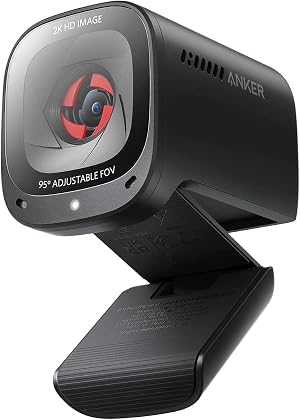
Best 2K Value Webcam
Anker PowerConf C200 2K Webcam
$50-$100
Check price on Amazon
What to look for
How we chose: Webcams and the Logitech Litra Glow key light were ranked as pairs by call-desk usefulness (auto light correction, mount clearance, one-box convenience, and price bands) rather than megapixels alone.
We judged on: Paired webcam + face key light for Zoom/Teams desks (not full streaming desk kits) · Currently sold at Amazon US with real listing photos, price, and rating · Distinct roles: overall pair, one-box ring cam, budget pair, 4K pair, 2K value cam · Face fill lights only; monitor light bars called out as a different category · Specs and buyer themes from public listings and maker pages.
Laptop cameras make most Zoom and Teams faces look muddy for one boring reason: the sensor is tiny and the room light is behind or above you. Buying a better webcam without a key light often wastes money. Buying a light without fixing a soft built-in camera leaves the same soft image. This page is the paired shortlist for video-call desks that want a webcam plus face light without building a full streaming desk.
It is not another webcam-only list (Best Webcam Under $150), not a monitor light bar shootout, and not a DSLR capture path (Cam Link kit). Those dig deeper on single categories. Here the question is simpler: which webcam and key-light combo should you buy for calls in 2026.
What to Look For
Face light, not desk wash. A key light or small panel pointed at your face fixes under-eye shadows. A monitor light bar is for reading the keyboard. Do not treat them as the same SKU.
Sensor before megapixels. 1080p with honest light correction often beats 4K in a dark room. Pair any webcam with controllable color temperature (about 2700K to 6500K) so skin tones match your room bulbs.
Mount clearance. Litra Glow and similar USB panels mount on the monitor bezel. Leave room above the webcam so the light does not cast a hard shadow from the camera body.
One app or none. Plug-and-play wins for Zoom-only desks. Save Camera Hub or AnkerWork for creators who will actually open fine controls.
Mic expectations. Built-in webcam mics are backup audio. For voice-first calls, pair this stack with a USB mic from the under-$100 mic guide.
Best Overall Pair: Brio 505 + Litra Glow
This is the default Zoom and Teams stack for most home desks. The Brio 505 brings auto light correction, auto-framing, Show Mode, and a privacy shutter in a USB-C body. The Litra Glow adds soft TrueSoft fill at adjustable color temperature without a wall wart. Together they fix the two problems that make laptop cameras look bad: soft optics and overhead room light.
✓ Pros
✕ Cons
✓ Pros
✕ Cons
Rough pair total: roughly $150 to $200. Buy this when you want a reliable everyday call look without juggling a separate ring light on a tripod.
Best One-Box Fix: EMEET SmartCam S600L
When desk space is the constraint, the EMEET SmartCam S600L puts a large 1/2-inch sensor and a ring light in one clamp. The on-body dial changes brightness and light mode without opening software for basic use. Reviewers like it as a brighter low-light image than bare budget webcams, with the obvious trade-off that autofocus can hunt and deeper AI modes want EMEET's app.
✓ Pros
✕ Cons
Rough total: roughly $75 to $100. Buy this when you refuse a second mount and still need face fill after dark.
Best Budget Pair: C920x + Litra Glow
The C920x remains the standard budget 1080p glass lens. Pair it with the Litra Glow instead of hoping auto light correction alone will save a dark office. You skip auto-framing and a privacy shutter, and you keep USB-A, but the image jump from a laptop camera is still the one most people notice on calls.
✓ Pros
✕ Cons
Rough pair total: roughly $100 to $150 with Litra Glow. Buy this when the budget caps for roughly $100 to $150 and lighting is the real complaint.
Best 4K Pair: MX Brio + Litra Glow
The MX Brio is the webcam half when you want 4K30 or 1080p60 plus fine ISO and shutter controls in Logi Options+. Those controls matter once a key light is in the mix, because you can lock exposure instead of fighting auto mode against a bright panel. It still wants a dedicated light in dim rooms; the Litra Glow remains the matching face fill, not a room flood.
✓ Pros
✕ Cons
Rough pair total: roughly $250 to $300. Buy this for client-facing calls and light streaming where resolution headroom and manual control matter.
Best 2K Value Webcam Half: Anker PowerConf C200
If you already own a Litra Glow, a cheap LED panel, or a bright window, the Anker PowerConf C200 is the webcam half that punches above plain 1080p. Reviewers like the larger aperture and privacy shutter; they also flag auto exposure drift until you lock settings in AnkerWork. Treat it as a camera upgrade that still benefits from a key light, not as a light replacement.
✓ Pros
✕ Cons
Combo comparison
The Bottom Line
Most call-quality complaints are lighting, not megapixels. Start with the Brio 505 and Litra Glow if you want a boring, reliable pair. Collapse to the EMEET S600L when one clamp is the requirement. Stay on the C920x plus Litra when money is tight, or step to the MX Brio when you will actually use fine exposure controls. Keep monitor light bars for desk wash, and add a USB mic only after the face already looks lit.
Frequently asked questions
- Do I need a key light if my webcam has auto light correction?
- Often yes for evening calls. Auto correction lifts a dark sensor, but a soft face light still removes under-eye shadows and keeps skin tones steadier than boosting digital gain. Pair correction with a Litra Glow-class panel when the room light is behind or above you.
- Is a monitor light bar the same as a key light for Zoom?
- No. Monitor light bars wash the desk and keyboard. A key light or small LED panel aims at your face. Use a bar for glare-aware desk lighting and a key light (or ring-light webcam) for the camera.
- Should I buy a 4K webcam before a light?
- Usually no. A sharp 1080p cam plus a soft face light beats a 4K sensor in a dark room for most Zoom and Teams windows. Step to MX Brio-class 4K after the face is already lit.
- When is an all-in-one ring-light webcam better than a separate pair?
- When desk clamps and USB ports are scarce. A ring-light cam like the EMEET S600L is one mount and one cable. Choose a separate Litra Glow pair when you want softer diffusion, independent CCT presets, or to keep a nicer webcam after you change lights.
- Where should I place the key light relative to the webcam?
- Slightly above and in front of your face, close to the lens axis so shadows fall softly downward. Avoid strong lights behind you. Leave bezel room so a monitor-mounted panel does not cast a hard shadow from the webcam body.
- Do I still need a USB microphone with these combos?
- Built-in webcam mics are fine for brief check-ins. For daily standups or client calls, a dedicated USB mic from the under-$100 mic guide is the next upgrade after lighting and camera.


