




Under $150 is where the webcam market actually gets interesting. Below $100 you're mostly choosing between old sensors and new marketing; above $150 you start paying for streaming features most people on a Zoom call every day will never touch. Right in this bracket, though, you get real 4K and 2K sensors, actual autofocus systems, and the first webcams that meaningfully beat a laptop camera in a dim room. The catch, and it's the part most roundups skip past, is that a bigger resolution number doesn't guarantee a better low-light image, and several of the best-reviewed options here only look good once you've installed and left running a companion app. This guide stays disciplined inside $100 to $150 (with two picks that dip under $70 for context) and focuses on the three things that actually decide whether you look good on a call: sensor size, verified low-light performance, and whether the camera needs software babysitting it to get there.
What to Look For
Sensor size and aperture matter more than the resolution printed on the box. A 4K webcam with a tiny sensor crammed behind that many pixels can still look grainier at night than a 1080p camera with a larger sensor and a wide aperture, because more pixels squeezed onto the same small chip means less light hitting each one. The Razer Kiyo Pro's Sony STARVIS sensor (1/2.8 inch, f/2.0 aperture) and the EMEET S600L's 1/2 inch sensor are both larger than what you'll find in most sub-$100 webcams, which is exactly why reviewers single them out for low-light performance independent of software.
Decide your low-light budget honestly before you shop. If your room gets dim after 6pm, you have two real options at this price ceiling: spend more on one webcam with strong built-in exposure processing, or buy a cheaper webcam and put $20 to $30 toward a small ring light or desk lamp. Buyer reviews consistently show the second path working just as well, if not better, than paying double for a camera that still needs help in a truly dark room. Keep that math in mind as you read the picks below; it changes which one is "best" for your setup. Would rather buy a matched pair than piece one together yourself? See Best Webcam and Key-Light Combos for Video Calls in 2026.
Check whether the camera needs its app running, not just installed once. Every camera in this guide connects over USB and shows up as a webcam without any software. The difference is what you're giving up if you skip the app: on the Brio 500 and C920x, nothing, they look the same with or without it. On the Anker, EMEET, and Razer cameras, the manufacturer's software is where the real exposure tuning, FOV switching, or adaptive light sensor lives, and it has to stay running in the background during your calls, not just get installed once. If you're on a work laptop that restricts installing background apps, that's a real dealbreaker, not a nitpick.
Autofocus hunting is usually a lens and lighting problem, not a defective unit. Every autofocus webcam will occasionally "hunt," racking focus back and forth, in low-contrast scenes: a plain wall behind you, dim lighting, or a busy patterned background all confuse the phase-detection or contrast-detection system. The fix that actually works across every camera here is improving your background contrast and adding light, not returning the webcam. The EMEET S600L rates a fast 0.2 second autofocus lock but several reviewers still report visible hunting in low-contrast rooms, which tells you the sensor and lighting matter more than the spec sheet's lock-time number.
The Picks
Logitech Brio 500 Full HD Webcam, Best Overall
RightLight 4 is the reason this is the pick: it's Logitech's auto-exposure processing, and it's what reviewers consistently credit for a visibly brighter, cleaner image in a dim room without any extra light or software running. At about $129.99 (down from a $170 launch price), it caps out at 1080p/30fps with no 4K or 60fps option, which is the real tradeoff for that low-light headroom. The auto-framing feature (RightSight) keeps you centered as you move around, though some reviewers describe it as jittery rather than smooth. The most common complaint isn't image quality, it's the clip-on mount, which several owners call flimsy and a loose fit on thicker monitor lids, so budget for a tripod if your desk setup needs one; a good docking station with a built-in webcam mount solves this if you're rebuilding your whole desk anyway.
✓ Pros
- ✓ RightLight 4 auto-exposure brightens dim rooms with zero extra light or software, the single most-praised feature
- ✓ Auto-framing keeps you centered without manual repositioning
- ✓ Built-in privacy shutter, no separate cover needed
- ✓ Dual noise-reducing mics cut keyboard and fan noise
- ✓ Looks good the moment you plug it in; the Logi Tune app is optional, only needed for FOV tweaks
✕ Cons
- ✕ Tops out at 1080p/30fps, no 4K or 60fps mode at this price
- ✕ The included clip-on mount is reported as loose and flimsy on thicker lids
- ✕ Auto-framing can be visibly slow to react per some owners
- ✕ Costs roughly double a C920x for the same 1080p resolution ceiling
Logitech C920x HD Pro Webcam, Best Value
This is the most-reviewed webcam in this guide by a wide margin, with over 20,000 Amazon ratings holding a 4.6 average, and every one of those reviews confirms the same thing: it needs zero software to work on Windows, Mac, Chromebook, or even a Switch 2. At about $69.99 it's the cheapest pick here and the one we'd point a first-time buyer toward for daylight or well-lit calls. The recurring complaint, and it's a real one, is low light: Reddit users describe it as "kinda suck[ing]" once the sun goes down, and say a cheap ring light made a dramatic, "not subtle," difference. Pair it with a $20 to $30 light rather than upgrading to a pricier camera and you'll likely end up with a better image than a $150 webcam alone.
✓ Pros
- ✓ True plug-and-play across every major platform, no drivers or app required
- ✓ Largest, most consistent review base of any pick here (20,000+ at 4.6 stars)
- ✓ Sharp, accurate color in daylight or a well-lit room
- ✓ Works natively with virtually every video call and streaming app
✕ Cons
- ✕ Small sensor genuinely struggles after dark; owners report the built-in light correction isn't enough
- ✕ Fixed 78-degree lens can't be narrowed for a tighter headshot crop
- ✕ Only 30fps, no 60fps option
- ✕ Needs a ring light purchase to be competitive after sunset
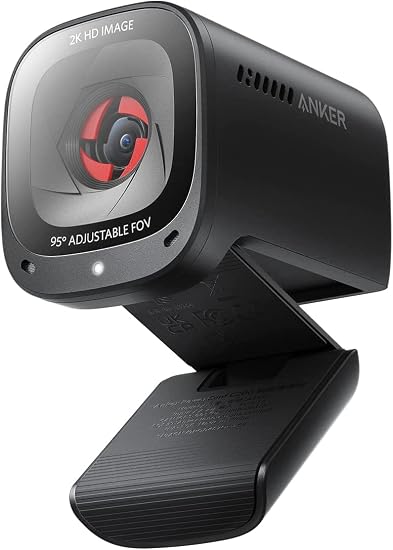
Anker PowerConf C200 2K Webcam, Best Budget
The oversized aperture on this lens is doing real work: reviewers repeatedly point to it as giving genuine low-light improvement without a ring light, unusual for a camera priced around $64.99. Autofocus is fast, described by owners as "blazing," with only occasional hunting in low light. The tradeoff is that the full FOV switching (65, 78, or 95 degrees) and manual exposure controls only work through the AnkerWork software; without it you're locked to auto exposure, which several reviewers say visibly drifts mid-call, prompting them to switch to manual settings in the app. A handful of buyers also report dead-on-arrival units needing replacement, worth knowing before you buy from a third-party seller.
✓ Pros
- ✓ Large-aperture lens captures noticeably more light than typical budget webcams
- ✓ Fast autofocus, only occasional hunting reported in low light
- ✓ 2K resolution is sharper than plain 1080p at this price
- ✓ Built-in privacy shutter
- ✓ Large 8,000+ review base for a non-Logitech budget pick
✕ Cons
- ✕ Auto exposure and white balance visibly drift mid-call for some users
- ✕ Image turns grainy with visible macroblocking during fast hand movement
- ✕ Some buyers report dead-on-arrival units
- ✕ FOV switching and manual exposure controls require the AnkerWork app running
EMEET SmartCam S600L 4K Webcam with Ring Light, Best for Streaming
A 1/2 inch sensor paired with an actual physical ring light is the differentiator here, and it's the largest sensor in this guide at about $99.99. Reviewers credit the combination for a genuinely brighter low-light image rather than relying on software correction alone, and the on-device dial lets you adjust the light mode and brightness without opening an app. The honest catch: the AI exposure tuning and the four lighting modes plus RGB effect only unlock with EMEET's EMEETLINK software installed and actively running, so this isn't a look-good-out-of-the-box camera the way the C920x is. The dual mics are basic, no noise-cancelling processing, so streamers serious about audio will still want a separate microphone; the same goes if you're recording sessions to archive, in which case an external SSD fills up faster at 4K than most people expect.
✓ Pros
- ✓ 1/2 inch sensor, one of the largest under $150, plus a built-in ring light for real low-light gains
- ✓ 0.2 second PDAF autofocus locks quickly in most conditions
- ✓ On-device dial adjusts light mode and brightness without opening software
- ✓ 4K at 30fps or smooth 1080p at 60fps
- ✓ Doubles as an actual desk light with 4 modes plus an RGB effect
✕ Cons
- ✕ Autofocus is prone to visible hunting in low-contrast or busy backgrounds
- ✕ AI exposure tuning and lighting customization require EMEETLINK running, not a plug-and-play experience
- ✕ Basic dual mics with no noise-cancelling processing
- ✕ Smaller review base than the established Logitech and Anker rivals here
Razer Kiyo Pro Streaming Webcam, Best for Low Light Without a Ring Light
This is the pick if you refuse to add a ring light to your desk: its Sony STARVIS IMX327 sensor, the same surveillance-grade chip family used in low-light security cameras, combined with an adjustable f/2.0 aperture, is why TechRadar, PCWorld, and Tom's Guide all cite it as one of the better webcams for low light without extra hardware. It's also the only camera here doing true 1080p at 60fps. The full adaptive light sensor, HDR, and FOV crop require Razer Synapse installed and running, and it's the lowest-rated pick in this guide (4.3 average), with recurring complaints that Synapse itself is bloated or buggy on some PCs. There's also no built-in privacy shutter, so budget for a $5 clip-on cover.
✓ Pros
- ✓ Sony STARVIS sensor with adjustable f/2.0 aperture genuinely adapts to ambient light, no ring light needed per reviewers
- ✓ True 1080p at 60fps, rare at this price point
- ✓ HDR helps balance tricky backlit home-office windows
- ✓ Adjustable FOV crop for tighter framing than fixed-lens rivals
✕ Cons
- ✕ Adaptive light sensor, HDR, and FOV crop require Razer Synapse installed and running
- ✕ Larger sensor drives a tighter native field of view, limiting for group shots
- ✕ No built-in privacy shutter
- ✕ Lowest average rating here, with complaints that Synapse is bloated or buggy on some PCs
How They Compare
| Webcam | Price | Resolution | Sensor / Aperture | Needs software to look good? | Rating |
|---|---|---|---|---|---|
| Logitech Brio 500 | $129.99 | 1080p/30fps | 4MP, RightLight 4 processing | No | 4.5 |
| Logitech C920x | $69.99 | 1080p/30fps | Standard, no low-light aid | No | 4.6 |
| Anker PowerConf C200 | $64.99 | 2K/1080p | Large aperture lens | Only for FOV/manual controls | 4.4 |
| EMEET SmartCam S600L | $99.99 | 4K/30fps, 1080p/60fps | 1/2 inch + ring light | Yes, for AI tuning and lighting modes | 4.4 |
| Razer Kiyo Pro | $99.99 | 1080p/60fps | Sony STARVIS 1/2.8 inch, f/2.0 | Yes, for adaptive light and FOV | 4.3 |
| Attribute | Logitech Brio 500 Full HD Webcam | Logitech C920x HD Pro Webcam | Anker PowerConf C200 2K Webcam | EMEET SmartCam S600L 4K Webcam with Ring Light | Razer Kiyo Pro Streaming Webcam |
|---|---|---|---|---|---|
| Rating | 4.5 | 4.6 | 4.4 | 4.4 | 4.3 |
| Price | Not listed | Not listed | Not listed | Not listed | Not listed |
| Resolution | 1080p @ 30fps (4MP sensor) | 1080p at 30fps | 2K (2688x1520) | 4K @ 30fps or 1080p @ 60fps | 1080p @ 60fps or 720p @ 60fps |
| Field of view | 90 degrees, adjustable to 78 or 65 degrees | 78 degrees | Adjustable: 65, 78, or 95 degrees (via software) | Not listed | Adjustable wide-angle lens (crop via Razer Synapse) |
| Connector | USB-C | Not listed | USB-A | Not listed | Not listed |
| Microphones | Dual noise-reducing mics | Dual omnidirectional stereo | Dual mics, rated pickup to ~3m | Not listed | Not listed |
| Software | Logi Tune (optional, not required for core image quality) | Not listed | AnkerWork app for FOV/manual controls | EMEETLINK/EMEET Vision required for AI exposure and lighting customization | Razer Synapse required for adaptive light sensor, HDR, and FOV controls |
| Focus | Not listed | Autofocus with HD light correction | Not listed | Not listed | Not listed |
| Connection | Not listed | USB-A | Not listed | Not listed | Not listed |
| Sensor size | Not listed | Not listed | Not listed | 1/2 inch CMOS | Not listed |
| Autofocus | Not listed | Not listed | Not listed | PDAF, rated 0.2s lock time | Not listed |
| Lighting | Not listed | Not listed | Not listed | Built-in ring light, 4 modes + RGB rainbow effect | Not listed |
| Sensor | Not listed | Not listed | Not listed | Not listed | Sony STARVIS IMX327 CMOS, 1/2.8 inch |
| Aperture | Not listed | Not listed | Not listed | Not listed | f/2.0, adjustable |
| Buy | View on Amazon | View on Amazon | View on Amazon | View on Amazon | View on Amazon |
Webcam vs. a DSLR or Mirrorless Camera for Streaming
A webcam wins for most people at this budget, a camera wins if you already own one. A capture card alone (needed to feed a DSLR or mirrorless camera into your PC as a webcam) commonly costs $80 to $150 on its own, before you've spent anything on the camera and lens, which usually erases the image-quality advantage unless you already own the gear for photography or video work. Every pick in this guide is a single USB cable, no capture card, no separate power adapter for the camera, and no lens breathing or hunting focus mid-call the way some camera-and-adapter combos do. If you're starting from zero, a $99 to $130 webcam like the Brio 500 or Kiyo Pro will look better on a Zoom call than a bare laptop camera for a fraction of the cost and hassle of a full camera rig.
The Bottom Line
For most people replacing a laptop camera or an aging basic webcam, the Logitech Brio 500 is the pick: it's the only camera here that gets meaningfully better in low light with zero software babysitting, at about $129.99. If your budget is tighter or your room is well-lit most of the day, the Logitech C920x at about $69.99 plus a cheap ring light will outperform expectations, and its 20,000-review track record is hard to argue with. Streamers who want 4K and don't want a separate light on their desk should look at the EMEET SmartCam S600L, and anyone allergic to extra desk hardware but serious about low light should go with the Razer Kiyo Pro. Whichever you land on, plan for the mic and lighting separately rather than expecting one $150 webcam to solve every problem at once, and if you're already rebuilding your desk setup, a good docking station or a comfortable mouse is worth doing at the same time.


