

| Light bar | Power | Bias backlight | Standout | Street price |
|---|---|---|---|---|
| BenQ ScreenBar | USB ~5W | No | Best overall glare-aware clamp bar | $100 to $150 |
| BenQ ScreenBar Pro | USB-C | No | Ultrawide coverage + motion sensor | $100 to $150 |
| BenQ ScreenBar Halo 2 | USB | Yes (rear) | Premium bias + wireless puck | $150 to $200 |
| Quntis Computer Monitor Lamp | USB | No | Best budget high-volume pick | $30 to $50 |
| Quntis with Backlight | USB | Yes | Budget bias + remote | $30 to $50 |
On this page
Our picks
- Best OverallBenQ ScreenBar LED Monitor Light BarProven ASYM-Light optics, 2700K-6500K tuning, USB power, and deep review volume make it$100-$200Check price on Amazon
- Best for UltrawidesBenQ ScreenBar Pro LED Monitor Light BarWider illumination claims, motion sensor, and ultrawide-friendly clamp at a mid-premium$100-$200Check price on Amazon
- Best with Bias LightBenQ ScreenBar Halo 2 LED Monitor Light BarFront light, rear backlight, wireless digital puck, and a wide curved-monitor clamp range$100-$200Check price on Amazon
- Best BudgetQuntis Computer Monitor Lamp (USB Light Bar)USB clamp bar with auto-dimming and massive review volume at a fraction of BenQ pricingUnder $50Check price on Amazon
- Best Budget Bias LightQuntis Computer Monitor Light Bar with BacklightFront plus backlight with a wireless remote for $30 to $50, built for dark-room desks on aUnder $50Check price on Amazon
Find your match
Top picks at a glance
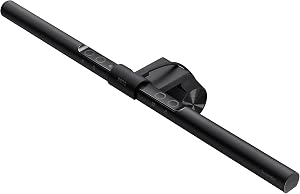
Best Overall
BenQ ScreenBar LED Monitor Light Bar
$100-$200
Check price on Amazon
Best for Ultrawides
BenQ ScreenBar Pro LED Monitor Light Bar
$100-$200
Check price on Amazon
Best with Bias Light
BenQ ScreenBar Halo 2 LED Monitor Light Bar
$100-$200
Check price on Amazon
Best Budget
Quntis Computer Monitor Lamp (USB Light Bar)
Under $50
Check price on Amazon
Best Budget Bias Light
Quntis Computer Monitor Light Bar with Backlight
Under $50
Check price on Amazon
What to look for
How we chose: Compared current Amazon US monitor light bars on clamp fit, USB power, CCT range, bias backlight, ultrawide coverage, street price, and review volume. The BenQ ScreenBar anchors the list, with competing light bars checked against their current listings.
We judged on: Clamp-on monitor light bars for desk task lighting (not floor lamps or ring lights) · Currently sold at Amazon US with real listing photos, price, and rating · Distinct roles: overall, ultrawide, bias backlight, budget, budget bias · USB-powered preference; note clamp thickness and webcam clearance · No fake claims; specs and buyer themes from public listings.
A monitor light bar is a thin LED that clamps to the top of a display and aims light at the keyboard and papers, not into the panel. That is the opposite of a side desk lamp that often paints a bright stripe across the screen. If the desk is already crowded with a dock, tablet, and notebook, a clamp-on bar frees the base footprint a classic lamp needs. If the room is already bright and the only job is soft fill for video calls, a room light or a simple key light may be enough (see look and sound better on video calls).
Bias or rear backlight models wash the wall behind the monitor for contrast in a dark room. Downward task bars only light the desk. Most bars take USB-A or USB-C power at a few watts from a monitor hub or charger. AC barrel bricks are uncommon in this class. Clamp thickness still matters: flat IPS panels usually fit; ultrawides, curved chassis, and ultra-thin portable screens are the usual miss cases.
This roundup compares current Amazon US clamp-on bars across premium BenQ optics and high-volume budget options. Specs and street prices come from maker sheets and live listings. It is a multi-pick buy guide, not a lab shootout. For a deeper dive on the base ScreenBar alone, see the BenQ ScreenBar review.
What to Look For
Clamp thickness and curve. Measure the top edge where the clamp will sit. BenQ's base ScreenBar lists about 0.4 to 1.2 in. Halo 2 advertises a wider 0.17 to 2.36 in window plus curved-monitor support. Budget bars often use a weighted clip that sits on the bezel rather than a tight thickness spec. Curved ultrawides can leave an uneven contact patch; a longer bar or Pro-class coverage helps more than a short stick light.
USB versus AC power. Expect USB-A or USB-C at roughly 5W-class draw. Confirm the hub stays powered when the PC sleeps if you want the light on during standby. You do not need a special USB-PD profile for these accessories.
CCT and brightness range. Useful bars offer warm evening white through daylight cool (often about 2700K to 6500K) with stepless or multi-step dimming. Fixed single-CCT USB sticks are phone-charger toys, not desk fixtures.
Asymmetric or anti-glare optics. Premium BenQ models market ASYM-Light so more output hits the desk than the LCD. Budget bars copy the idea with mixed consistency. No bar fixes a bright window behind you or a glossy desk reflection from other lamps.
Bias backlight versus task-only. Rear glow (Halo-class and some Quntis dual-light SKUs) softens the contrast between a bright panel and a dark wall. Buy it when you work in a dim room. Skip it when you only need keyboard wash.
Webcam clearance. A top-center clip cam often fights the bar for the same plastic. Side mounts, under-monitor bars, and laptop lid cameras avoid the collision.
Ultrawide fit. Prefer longer coverage and Pro or Halo-class clamps when the panel is 34 in or wider. Dual monitors usually mean two bars, or lighting only the primary.
Best Overall: BenQ ScreenBar
The BenQ ScreenBar remains the default clamp-on task light: ASYM-Light beam, 2700K-6500K tuning, USB ~5W, and a deep review base around a 4.7 rating. Street price of roughly $100 to $150 is premium for a desk light, but it is the model that made the category mainstream. Touch controls on the bar are polarizing; that is the clean upgrade line to Pro or Halo if you already know you want motion sensing or a wireless puck.
✓ Pros
- ✓ Proven ASYM-Light clamp-on design aimed at reducing screen glare
- ✓ 2700K-6500K CCT with USB ~5W power from a hub or charger
- ✓ Strong Amazon rating (~4.7) and years of owner feedback
✕ Cons
- ✕ Street price of roughly $100 to $150 versus capable budget USB bars
- ✕ Touch strip can feel fiddly versus a dial or wireless puck
- ✕ Clamp window (about 0.4-1.2 in) excludes some panels
Who it is for: crowded single-monitor desks that need glare-aware keyboard light. Who should skip it: buyers who only need a $40 bar, or who already know they want Halo backlight or Pro motion sensing. Deeper base-model notes live in the BenQ ScreenBar review.
Best for Ultrawides: BenQ ScreenBar Pro
The BenQ ScreenBar Pro is the wider-coverage BenQ: over 1000 lx central brightness in maker claims, a larger 500 lx desk zone, ultrasonic motion auto on/off, and a clamp built for flat, curved, and ultrawide panels. Street price sits roughly $100 to $150. It stays a front task light (no Halo rear bias), which keeps the pick focused when the main problem is illuminating a 34 in-class desk zone.
✓ Pros
- ✓ Wider illumination zone aimed at ultrawide and large desks
- ✓ Motion sensor auto on/off plus ambient auto-dimming
- ✓ High Amazon rating (~4.8) with strong review volume for a premium accessory
✕ Cons
- ✕ Costs more than the base ScreenBar without adding bias backlight
- ✕ Still needs a free USB port and clear webcam layout
- ✕ Overkill for a small 24 in desk that only needs keyboard wash
Best for ultrawide and dual-width desks that outgrow the base ScreenBar's coverage. Skip if you specifically want rear wall glow (Halo 2) or a sub-$50 bar.
Best with Bias Light: BenQ ScreenBar Halo 2
The BenQ ScreenBar Halo 2 adds tri-zone rear backlight, a digital wireless controller, and a redesigned clamp (about 0.17 to 2.36 in, including many curved screens). Street price of roughly $150 to $200 makes it the premium dark-room pick when desk wash and wall bias both matter. It is the step up when the base ScreenBar's touch strip and lack of backlight are the complaints after a week.
✓ Pros
- ✓ Front task light plus rear bias backlight for dark-room contrast
- ✓ Wireless digital puck for brightness, CCT, and backlight levels
- ✓ Wide clamp range including many curved monitors
✕ Cons
- ✕ Highest street price on this list (roughly $150 to $200)
- ✕ More features than a simple keyboard wash requires
- ✕ Wireless puck is one more desk item to charge or place
Best for dim offices and gaming desks that want wall glow plus desk light. Skip if budget leads, or if a front-only Pro or base ScreenBar already solves the glare problem.
Best Budget: Quntis Computer Monitor Lamp
The Quntis Computer Monitor Lamp is the high-volume USB bar: auto-dimming, touch brightness and CCT, space-saving clamp, and a street price of roughly $30 to $50 with well over ten thousand ratings. Optics and build are not BenQ-class, but the core job (desk wash without a lamp base) is what most buyers need. It is the pick when $100 to $150 feels wrong for a first light bar.
✓ Pros
- ✓ Real clamp-on USB monitor light for roughly $30 to $50
- ✓ Huge review volume (~13k+ ratings) for a budget accessory
- ✓ Auto-dimming and adjustable CCT without a BenQ price
✕ Cons
- ✕ Build and optical polish trail BenQ ASYM-Light models
- ✕ Touch-only controls; no Halo-class wireless puck on this SKU
- ✕ Fit and glare results vary more across monitor shapes
Best for first-time buyers and secondary monitors. Skip if you already know you want BenQ optics, motion sensing, or integrated bias light.
Best Budget Bias Light: Quntis Monitor Light Bar with Backlight
The Quntis light bar with backlight is the value dual-light option: front desk wash plus rear glow, wireless remote, stepless dimming, and a street price of roughly $30 to $50. It will not match Halo 2's clamp refinement or digital puck, but it is the cheapest way on this list to get bias lighting without paying BenQ premium money.
✓ Pros
- ✓ Front wash plus rear backlight under about $50
- ✓ Wireless remote for brightness and CCT without reaching the bar
- ✓ Strong mid-volume review base for a dual-light budget SKU
✕ Cons
- ✕ Not BenQ-level optics, clamp patents, or digital display puck
- ✕ Dual-light budget builds can feel less rigid on thick curved panels
- ✕ Fewer long-term polish reports than the classic Quntis bestseller
Best for dark-room desks that want bias light on a budget. Skip if you only need front task light (classic Quntis) or want Halo 2's clamp and controller.
Comparison
The Bottom Line
Start with the BenQ ScreenBar when you want the proven clamp-on task light and can spend roughly $100 to $150. Move to the BenQ ScreenBar Pro for ultrawide coverage and motion sensing, or the BenQ ScreenBar Halo 2 when rear bias light and a wireless puck matter in a dark room. Choose the Quntis Computer Monitor Lamp for a first bar under $50, or the Quntis backlight model when you want budget bias lighting. Measure clamp thickness and plan webcam placement before you order. For base ScreenBar detail, stay on the BenQ ScreenBar review; for face lighting on calls, use the video call lighting guide.
Frequently asked questions
- Do monitor light bars reduce screen glare?
- Well-designed bars aim light at the desk instead of into the panel, which is why many owners prefer them to a side desk lamp. They will not fix bright windows behind you or reflections from other room lights.
- Will a light bar fit my ultrawide or curved monitor?
- Measure top-edge thickness and check the maker clamp range. Base ScreenBar lists about 0.4 to 1.2 in. Halo 2 lists a wider window including many curved panels. Budget clips vary; curved ultrawides are the common miss case.
- USB-powered or AC-powered?
- Most monitor light bars use USB-A or USB-C at a few watts from a monitor hub, dock, or charger. Confirm the port stays powered in sleep if you want the light on during standby.
- What is bias lighting on a monitor light bar?
- Bias or rear backlight washes the wall behind the display to soften contrast in a dark room. Halo-class and some dual-light budget bars include it. Front-only bars only light the desk.
- Will a monitor light bar block my webcam?
- A camera that clips to the center of the top bezel often shares space with the bar. Side mounts, under-monitor bars, and laptop lid cameras avoid the conflict.
- Is BenQ worth it over a $40 Quntis bar?
- Pay BenQ when clamp fit, asymmetric optics, and long-term polish matter. Choose Quntis when you want the clamp-on form factor first and can live with more variability in build and glare control.


