
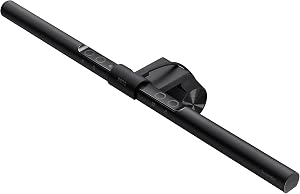

A monitor light bar solves a desk problem a floor lamp and a classic desk lamp both miss: you want the keyboard and papers bright without a bright blob reflecting in the screen. The BenQ ScreenBar LED Monitor Light Bar is the model that made that form factor mainstream. It clamps to the top edge of the display, pulls about 5W from USB-A, and uses BenQ's ASYM-Light asymmetric beam so more light hits the desk than the panel.
This review covers the base ScreenBar only (street price in the $100 to $150 range). Specs and price come from BenQ's sheets and the current Amazon listing. Buyer themes below track consistent owner feedback (clamp fit, webcam clearance, touch controls), not a personal lab shootout. Mentions of ScreenBar Plus and Halo are context only so you know when to step up.
Who a monitor light bar is for
A desk lamp puts a tall base on the surface and often throws light into the panel. A monitor bar hangs from the top bezel and aims downward. That trade is the whole product category.
Prefer a light bar when:
- Desk real estate is already full (keyboard, tablet, notebook, dock)
- You sit close to a bright display and hate specular glare from a side lamp
- You want warm light for evening work and cooler light for daytime focus on one fixture
Prefer a simple desk lamp when:
- You only need occasional task light and will not pay roughly $100 to $150 for a clamp bar
- The monitor is ultrawide/curved in a way that fights the clamp geometry
- You already light the room well and only need a soft fill
Amazon rating sits around 4.7, which matches the "works as advertised for most flat monitors" theme in long-form owner writeups. Treat that as crowd signal, not a lab grade.
Clamp fit and webcam clearance
BenQ lists a clamp range of roughly 0.4 to 1.2 inches (about 10 to 30 mm) for the monitor's top edge thickness. That covers many mainstream IPS and VA panels. It does not cover every ultrawide with a thick chassis lip, every portable USB-C display with a skinny bezel, or every all-in-one with a weird top profile.
Before you order, measure the top edge where the clamp will sit. If you are between sizes, owners often report the clamp either feels loose or needs care not to mark a soft finish. Curved monitors can leave a gap on one side of the rail; the bar still works for many people, but the contact patch is less even than on a flat panel.
Webcam note: a camera that clips to the center of the top bezel often fights the ScreenBar for the same strip of plastic. Side-mounted cams, laptop lid cams, and under-monitor bars avoid that collision. If your setup depends on a centered C920-class clip, plan the layout before you buy.
ASYM-Light beam and glare
BenQ markets ASYM-Light as an asymmetric optical design: more output toward the desk, less bounced into the viewer's eyes and less wash across the LCD. The useful coverage area is listed around 23.6 x 11.8 inches of desk surface, which is a keyboard-plus-notebook zone rather than a full 60-inch deep maker bench.
Owner themes are consistent here: the bar reduces the classic "lamp in the screen" reflection compared with a side desk lamp aimed at the same spot. It will not fix a window behind you, a glossy desk, or a room that is simply too dark for the display's ambient light sensors. Think of it as targeted task light, not a room fixture.
Flicker claims in marketing materials target PWM-sensitive users; BenQ positions the ScreenBar as flicker-free for typical office use. If you are highly sensitive, treat any LED fixture as a try-and-return item through Amazon's window rather than assuming every driver topology matches every person.
Brightness, hue, and USB power
Headline numbers from the maker's spec sheet:
| Spec | Value |
|---|---|
| Center brightness | ~500 lux at 30 cm |
| Color temperature | 2700K to 6500K |
| Power | USB-A, about 5W |
| Clamp range | 0.4 to 1.2 in top edge |
| Desk coverage | ~23.6 x 11.8 in |
500 lux at 30 cm is bright enough for typing and paper under a typical monitor height. It is not a photo softbox. Hue runs from warm evening white (~2700K) to daylight-cool (~6500K), which is the main reason people pay up versus a fixed-CCT USB stick light.
Power is plain USB-A at roughly 5W. That usually means a free port on a monitor USB hub, a dock, or a wall charger. It does not need a special PD handshake. It does need a port that stays powered when the PC sleeps if you want the light on during standby; that depends on the hub, not BenQ.
Controls and auto-dimming
The base ScreenBar uses a capacitive touch strip / sensor area on the bar for brightness, CCT, and an auto mode that reacts to ambient light. Owner themes split here: some like the clean look with no knob, others call the touch targets fiddly (especially in the dark or with dry fingers).
That is the clean upgrade line to ScreenBar Plus: same clamp idea, with a wired dial for brightness and color temperature if you hate hunting for a touch zone. Halo adds a rear bias light for the wall behind the monitor. Neither is required for the core job; both exist when the base model's controls or lack of backlight bug you after a week.
This review stays on the base unit. A full three-SKU shootout belongs in a light-bar roundup once that page ships, not here.
Space savings and desk ergonomics
Removing a lamp base frees a surprising amount of depth on a shallow desk. That is the strongest non-optical argument for the ScreenBar. Cable management is one thin USB lead instead of a lamp brick plus cord. For standing desks that already carry a monitor arm, a top-mounted bar moves with the panel, which a floor lamp never will.
Tradeoffs stay real: the bar adds height above the monitor, can shade a status LED on some panels, and looks odd on dual-monitor setups unless you buy two (or light only the primary).
✓ Pros
- ✓ Clamps to the monitor so the desk stays clear of a lamp base
- ✓ ASYM-Light asymmetric beam aimed at reducing screen glare versus a side desk lamp
- ✓ 2700K-6500K tuning plus ~500 lux center output for keyboard and paper work
- ✓ USB-A ~5W power from a monitor hub, dock, or charger
- ✓ Strong Amazon rating (~4.7) and a deep review base for a niche accessory
✕ Cons
- ✕ Street price of roughly $100 to $150 is steep if a basic USB desk lamp would do
- ✕ Touch controls feel fiddly to some owners versus a physical dial (Plus)
- ✕ Clamp thickness window (0.4-1.2 in) excludes some panels and portable displays
- ✕ Can block or crowd a top-center webcam mount
Price reality and alternatives
Around $100 to $150, the ScreenBar is a premium desk accessory, not an impulse USB gadget. You are paying for the clamp ecosystem, optical design, and CCT range. Budget bars exist on Amazon in the $30 to $50 band with mixed build notes; this review does not crown a budget champ because that is roundup work.
Buy the base ScreenBar when clamp-on, glare-aware desk light is the goal and the monitor fits the thickness window.
Step to Plus when you already know you want a haptic dial more than a touch strip.
Step to Halo when you specifically want rear bias lighting for wall contrast, not just desk wash.
Skip the category when room lighting is already good, or when roughly $100 to $150 is better spent on the monitor, chair, or a dock you use every day.
Verdict
The BenQ ScreenBar remains the default recommendation in the clamp-on monitor light niche: clear desk, tunable white, USB power, and a beam shape aimed at the keyboard instead of the panel. It is not cheap, the clamp and webcam caveats are real, and touch controls are polarizing. Specs and street price above come from maker materials and Amazon listings, not a personal lab. If the bezel fits and the desk is crowded, View on Amazon and confirm the current price before you order.


