
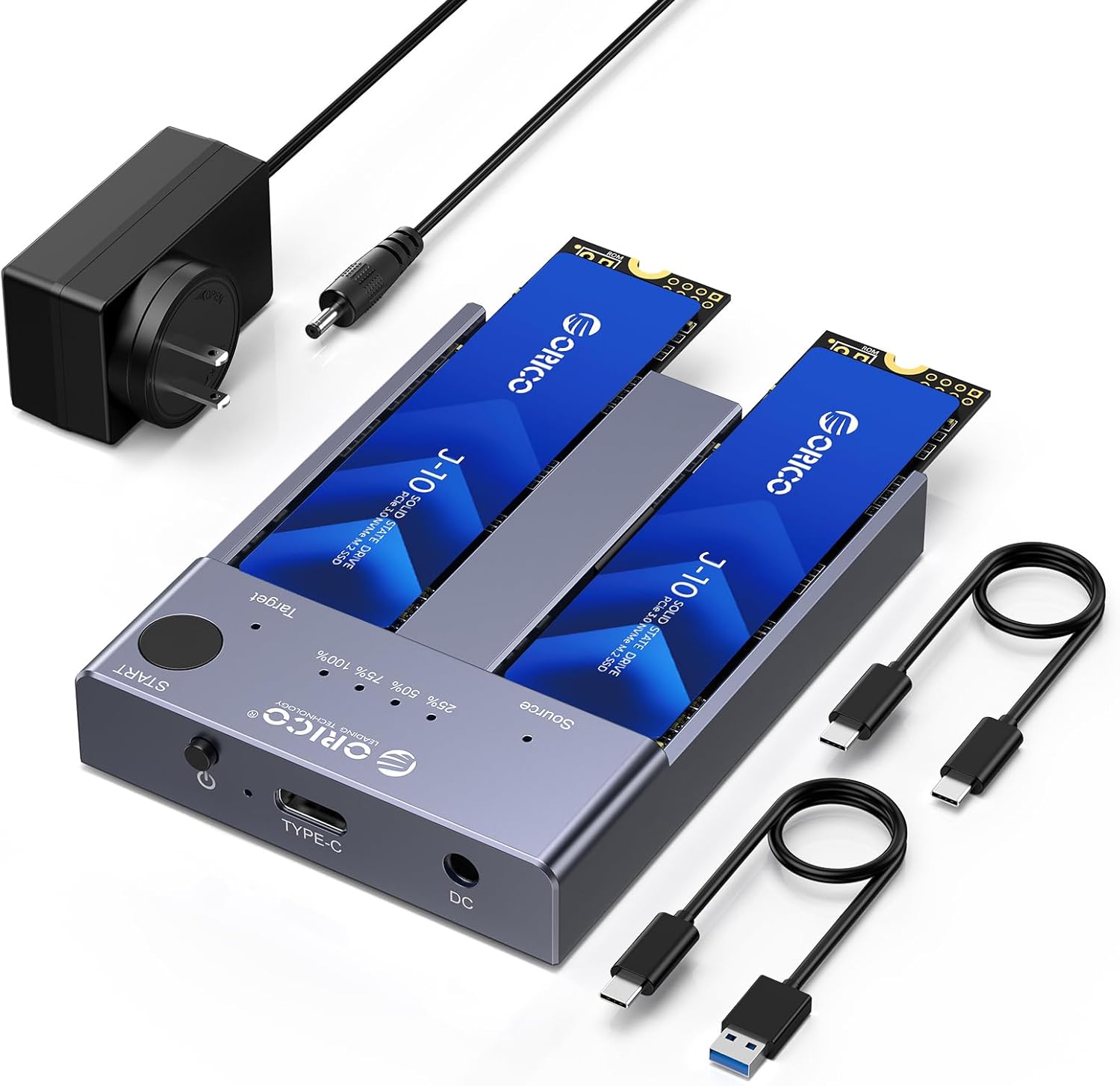
Swapping a laptop or desktop to a bigger SSD usually means cloning software, a spare USB enclosure, and an evening of babysitting a progress bar. The ORICO M2P2-C3 dual-bay NVMe cloner skips the computer for the copy itself: drop the old M.2 NVMe drive in one bay, the new one in the other, hold a button, and the dock duplicates the drive on its own. Plug it into a computer instead and it works as a two-drive USB-C dock at up to 10Gbps. Amazon lists it at $79.99 as of October 2026, sold by ORICO's US store, with about 3.9 stars across 37 ratings.
This review is spec and source grounded, not a lab session. Specs and claims come from ORICO's Amazon listing, ORICO's product page and manual, and recurring Amazon buyer feedback. Where ORICO makes a claim, it is phrased as a claim.
What a dual-bay NVMe cloner dock is, in plain terms
An M.2 NVMe SSD is the gum-stick drive inside most modern laptops and desktops. A single-bay enclosure turns one of those sticks into a USB drive. A dual-bay cloner dock holds two sticks side by side and adds a second job: it can copy one drive onto the other, sector by sector, with no computer attached. That copy (a clone) includes the operating system, partitions, and boot data, which is why techs and upgraders use it to move Windows or Linux to a larger SSD without reinstalling.
The M2P2-C3 does both jobs. In clone mode it runs off its power adapter alone. In dock mode it shows up on a Windows, Mac, or Linux computer as one or two external drives over a single USB-C cable. If you want the background on the drive format itself, the NVMe explainer covers it in a few minutes.
Who it is for, and who should skip it
A good fit:
- Laptop and desktop owners upgrading to a bigger NVMe SSD who want a clone without installing cloning software
- PC builders and repair techs who image or duplicate M.2 drives regularly (one buyer describes cloning a standard image onto new office PCs with it)
- Anyone who wants a cheap two-drive USB-C dock for reading old M.2 sticks pulled from retired machines
Skip it if:
- You only ever need one drive connected. A single-bay enclosure is smaller and cheaper, and The Best M.2 NVMe USB-C Enclosures in 2026 covers those
- You want near-internal speed for editing off the drive. That needs USB4 or Thunderbolt, covered in Best USB4 M.2 NVMe Enclosures Under $100 in 2026
- Your drives are 2.5-inch SATA SSDs or hard drives. Best Dual-Bay SATA Drive Docks with Offline Clone in 2026 is the right page for those
- Your M.2 drives are SATA rather than NVMe. The M2P2-C3 does not read or clone M.2 SATA
Specs
| Spec | ORICO M2P2-C3 |
|---|---|
| Bays | 2 x M.2, tool-free, labeled Source and Target |
| Drive type | M-key NVMe PCIe only (no M.2 SATA, no mSATA) |
| Drive lengths | 2230, 2242, 2260, 2280, 22110 (per the Amazon listing) |
| Capacity | Up to 4TB per bay, 8TB total (ORICO claim) |
| Host interface | USB-C, USB 3.2 Gen 2 (10Gbps), UASP |
| Claimed speed | About 1,000MB/s with the C to C cable, about 500MB/s with the A to C cable |
| Controller | ASMedia ASM2362 plus ASM2806A (per ORICO's product page) |
| Power | External 5V/4A adapter |
| Size | About 82.2 x 62 x 13.8 mm, aluminum alloy |
| In the box | Dock, USB-C to USB-C cable, USB-A to USB-C cable, power adapter, two silicone buckles, two thermal pads |
| Sleep | Auto sleep after 10 minutes idle |
| Price | $79.99 on Amazon (October 2026) |
How offline cloning works
The clone process is the reason to buy this dock, so it is worth knowing the rules before you start:
- Source goes in the Source bay, target in the Target bay. The bays are labeled on the dock. Swapping them is the classic cloning mistake, and it overwrites the drive you meant to keep.
- The target must be equal to or larger than the source. ORICO's manuals say equal or larger; the Amazon listing says the target must be larger. Giving yourself headroom avoids a failed clone on drives that are nominally the same size but differ by a few sectors.
- The clone wipes the target. Everything on the target drive is replaced. Back it up first if it holds anything you care about.
- No computer during the clone. Connect only the power adapter, not the USB cable. Then press and hold START until the progress LEDs flash, per ORICO's instructions, and release to begin.
- Watch the 25, 50, 75, and 100 percent LEDs. When 100 percent stays lit, the copy is done.
Two practical notes from the manual and buyer feedback. First, after an offline clone, Windows may show the target drive as offline the first time you connect it to the same machine as the source, because both carry the same disk signature; setting it online in Disk Management fixes that. Second, a clone copies sectors, so a larger target ends up with unallocated space you expand afterward in your OS's disk tool.
The Amazon listing does not publish a clone time figure for this 10Gbps model, so plan on a long coffee break for a full 1TB or 2TB drive rather than a fixed number.
Using it as a regular two-drive dock
Connected to a computer, the M2P2-C3 is a USB 3.2 Gen 2 device. That sets the ceiling: ORICO claims about 1,000MB/s over the included USB-C to USB-C cable and about 500MB/s on the USB-A cable. A modern NVMe drive is capable of several times that internally, so the dock, not the SSD, is the bottleneck. That is fine for copying photos, pulling files off an old laptop drive, or a quick backup. It is not the tool for editing large video projects directly off the drive.
Both bays can run at once, and both drives share the one 10Gbps link, so copying between the two drives through a computer is slower than either drive alone. For faster numbers, ORICO sells two siblings:
- The ORICO N2-C 20Gbps duplicator uses USB 3.2 Gen 2x2 (20Gbps). That speed only appears on hosts with a Gen 2x2 port, which is mostly some Windows desktops and laptops. Macs do not support Gen 2x2, and many USB4 and Thunderbolt ports also link Gen 2x2 devices at 10Gbps, so check your port before paying more for 20Gbps.
- The ORICO IT28N-C 40Gbps cloner uses USB4 with Thunderbolt 4 compatibility. ORICO claims about 3,300MB/s read and 3,000MB/s write on Thunderbolt 4 laptops and about 20 minutes to clone a 1TB drive, with bandwidth shared when both drives are busy.
NVMe vs SATA M.2, and M key vs B+M key
M.2 is a physical shape, not a protocol. An M.2 stick can speak NVMe (fast, PCIe based) or SATA (older, capped near 550MB/s). The notches on the gold edge, called keys, give a hint:
- M key (one notch) sticks are almost always NVMe. These work in the M2P2-C3.
- B+M key (two notches) sticks are usually SATA. The M2P2-C3 does not support M.2 SATA, so most B+M key drives will not be recognized, even though they fit in the slot.
If you need to clone M.2 SATA drives, the N2-C handles both NVMe and SATA, but only same-protocol clones (NVMe to NVMe or SATA to SATA), per ORICO. The SATA explainer covers the older protocol if you are unsure what is in an old laptop.
Heat and cooling claims
The M2P2-C3 is an open-top aluminum dock. Each bay uses a silicone buckle to hold the stick and a thermal pad between the drive and the metal body, and ORICO describes the aluminum shell as the heat path. There is no fan. ORICO's own product page tells buyers to handle it with care because of potential heat during use.
Buyers agree on that point: a recurring Amazon comment is that the dock gets very hot during long clones, and one buyer sets a small fan on top while cloning. Because the SSDs sit exposed, a fast drive copying for a long time can throttle. Keep the dock on a hard surface with open air around it, and point a desk fan at it for big clones.
The faster IT28N-C adds a built-in fan and separate aluminum heatsink sleeves for each drive, which is the stronger thermal design if you clone often.
Limits worth knowing
- No RAID. ORICO markets the M2P2-C3 as a dock and duplicator only. Each drive appears separately on a computer.
- Clone reliability depends on the drive. Reviews are mixed. Several buyers say it works well for cloning, while a few report clones that would not boot, including one who says Windows clones are hit and miss and the bootloader was corrupted. Keep the source drive untouched until the cloned drive boots in the target machine.
- Do not unplug mid-clone. Pulling power or a drive during a clone leaves the target incomplete. Start over if that happens.
- Short cables. Buyers note the included cables are on the short side.
- 10Gbps ceiling. The dock is the limit, not your SSD.
✓ Pros
- ✓ One-button offline clone with no computer or software needed
- ✓ Tool-free bays fit 2230 through 22110 NVMe sticks
- ✓ Works as a two-drive USB-C dock on Windows, Mac, and Linux
- ✓ Includes USB-C and USB-A cables plus the power adapter
- ✓ About $80, cheaper than buying cloning software and a second enclosure separately
✕ Cons
- ✕ 10Gbps only, about 1,000MB/s claimed in dock mode
- ✕ No M.2 SATA support, despite many B+M key sticks fitting the slot
- ✕ Runs hot during long clones and has no fan
- ✕ Mixed reports of non-booting Windows clones
- ✕ ORICO's 40Gbps IT28N-C costs only about $10 more
Price and value
At $79.99, the M2P2-C3 sits between the two cheaper ways to clone an NVMe drive. A single-bay 10Gbps enclosure costs less, but you then need cloning software and a computer tied up for the copy. A SATA cloner dock costs less still, but it cannot take M.2 NVMe sticks at all.
The awkward comparison is inside ORICO's own lineup. The IT28N-C lists at $89.99 on Amazon as of October 2026, adds a fan and 40Gbps USB4, and claims much faster clones. The N2-C costs $139.95 for 20Gbps plus M.2 SATA support. For most buyers with a USB4 or Thunderbolt laptop, the extra $10 for the IT28N-C is the better spend. The M2P2-C3 still makes sense if you want the smallest, simplest dock, you mostly clone offline (where the USB link speed matters less), or you find it on sale.
Verdict
The ORICO M2P2-C3 does what a budget NVMe cloner should: two tool-free bays, a one-button PC-free copy, and a usable 10Gbps two-drive dock for about $80. Its weak points are heat on long clones, mixed boot reliability reports, and no M.2 SATA support. If you have a USB4 or Thunderbolt computer, the IT28N-C is worth the small step up. If you just want a simple way to move an NVMe drive to a bigger one, View on Amazon for the M2P2-C3.
Read next
- Best Dual-Bay SATA Drive Docks with Offline Clone in 2026
- The Best M.2 NVMe USB-C Enclosures in 2026
- Best USB4 M.2 NVMe Enclosures Under $100 in 2026
- Samsung 990 EVO Plus vs WD Black SN7100: Which 2TB NVMe SSD?
- Best NVMe SSDs for a NAS Cache in 2026: Endurance, Heat, and Compatibility
- NAS and homelab hub


