




An NVMe cache is a small, fast SSD that sits in front of the slower hard drives in your NAS. The NAS watches which blocks get read over and over (a photo library thumbnail index, a VM disk, the folder your whole team opens every morning) and keeps copies of them on the SSD, so the next request comes back from flash instead of a spinning disk. If your NAS has M.2 slots, a pair of NVMe drives is often the cheapest way to make it feel faster for small, random work. This guide covers which drives make sense for that job right now, and which ones are listed and buyable on Amazon US in October 2026. It is about the drives themselves; if you want a NAS that is all flash from the start, read Best All-Flash NVMe NAS Boxes in 2026 instead. For the basics of the interface, the NVMe wiki entry has a short primer.
When an NVMe Cache Helps (and When It Does Not)
Read cache vs read-write cache. A read cache only holds copies of data that already lives on the hard drives. If the SSD dies, you lose speed, not files. A read-write cache also absorbs incoming writes before they are flushed to the disks, which is faster but riskier: until the flush happens, the only copy of new data is on the SSD. That is why Synology requires at least two SSDs in a redundant set (usually a mirrored RAID 1 pair) for a read-write cache, and why endurance and power loss behavior matter much more in that mode.
Where it helps. Small random reads and writes: virtual machines and containers, databases, Photos or Plex metadata, and many users hitting the same shared folders. These are the workloads where a hard drive spends most of its time seeking.
Where it does little. Big sequential transfers, like copying a 50GB video file once or streaming a movie. Hard drives already handle those well, and a single 2.5GbE or 1GbE port often limits you before the disks do. A cache also cannot help with data it has not seen yet, so a one-off backup job runs at disk speed.
Cache vs SSD storage pool. Some NAS models can use M.2 drives as their own storage pool instead of a cache. That is often the better use for a small, hot data set like VMs or Docker volumes, because the data lives on flash full time. Whether your NAS allows it, and with which drives, depends on the vendor and model.
What to Look For
Endurance (TBW). Terabytes written is the maker's rated write budget over the warranty. A read cache barely touches it. A read-write cache, a SLOG device, or a busy VM pool can burn through a consumer rating much faster than a desktop would. For write caching, favor drives with a high TBW per terabyte of capacity.
DRAM vs DRAM-less. Drives with their own DRAM keep the mapping table on board and hold up better under sustained mixed I/O. DRAM-less drives borrow a little host memory instead, which is fine on a desktop but less consistent under a NAS workload that never lets up.
Power loss protection. Enterprise drives like Synology's SNV5420 add capacitors that let the drive finish writing data in flight when power cuts out. Consumer drives such as the 990 PRO and WD Red SN700 do not have that hardware. If you run a read-write cache without it, put the NAS on a UPS; see Best Compact UPS Units Under $150 for a Desk NAS in 2026.
Heat and clearance. NAS M.2 slots often sit under a cover or a drive cage with little airflow and little vertical room. A bare 2280 drive is the safest fit. Check clearance before you buy a version with a tall heatsink, and use the NAS vendor's thermal pad or heatsink if one is supplied.
Compatibility. This matters most on Synology. On 2025 Plus models such as the DS925+ and DS1525+ running DSM 7.3, Synology reopened support for unlisted third-party hard drives and 2.5-inch SATA SSDs, but unlisted M.2 NVMe drives can only be migrated from an existing Synology system. They cannot be used to create a new cache or M.2 storage pool. For those models, the drive needs to be on Synology's compatibility list for your exact NAS, and Synology's own SNV drives are the straightforward way to meet that. Older Synology models and other brands (UGREEN, TerraMaster, QNAP, Asustor, TrueNAS builds) are generally more relaxed about third-party NVMe drives, but check your model's list before you buy. Our Synology DS925+ Review covers what this means in practice.
Best Overall: Samsung 990 PRO 1TB
The Samsung 990 PRO 1TB is the default pick for NAS owners whose M.2 slots accept third-party drives. Samsung lists 1GB of LPDDR4 DRAM, TLC V-NAND, a PCIe 4.0 x4 interface, 600 TBW for the 1TB model, and a 5-year limited warranty. It is sold by Amazon at about $240, which works out to roughly $240 per terabyte, and it carries a 4.7-star average across more than 13,000 ratings. Its Gen4 speed is wasted in most NAS slots, which often run at PCIe 3.0 or with fewer lanes, but the DRAM and steady random performance are what a cache actually uses.
✓ Pros
- ✓ DRAM cache and TLC NAND for steady mixed I/O
- ✓ 600 TBW and a 5-year warranty on the 1TB model
- ✓ Sold and shipped by Amazon with a huge owner base
✕ Cons
- ✕ No power loss protection
- ✕ Not usable for a new cache on 2025 Synology Plus models unless it is on your model's list
- ✕ Gen4 speed is mostly wasted in NAS slots
Who it is for: UGREEN, TerraMaster, QNAP, and TrueNAS owners, plus older Synology models that accept it, who want a fast and well-known drive for a read cache or a mirrored read-write pair. Price per TB: about $240. Watch out for: heavy write caching on a 600 TBW budget; the WD Red below has more than three times the rating.
Best NAS-Rated Endurance: WD Red SN700 1TB
The WD Red SN700 1TB is built for exactly this job. Western Digital rates the 1TB model at 2,000 TBW, about 2 petabytes of rated writes on a 1TB drive, with a 5-year limited warranty, PCIe Gen3 x4, DDR4 DRAM, and TLC NAND. Gen3 is not a drawback in a NAS, where M.2 slots commonly run at Gen3 anyway. The drive does not have power loss protection.
✓ Pros
- ✓ 2,000 TBW, the highest rating per dollar here
- ✓ DRAM and TLC NAND, built for 24/7 NAS duty
- ✓ Also sold in 500GB (1,000 TBW), 2TB, and 4TB
✕ Cons
- ✕ Currently sold by third-party sellers near $500 for 1TB
- ✕ No power loss protection
- ✕ Gen3 speeds only
Who it is for: anyone running a read-write cache or a busy VM pool who cares more about write endurance than raw speed. Price per TB: about $500 at the current listing, which is steep. Even so, it gives about 4 TB of rated writes per dollar, versus about 2.5 for the 990 PRO. If the price drops back toward Amazon's own stock, this becomes the easy recommendation.
Best for Synology NAS: Synology SNV5420-800G
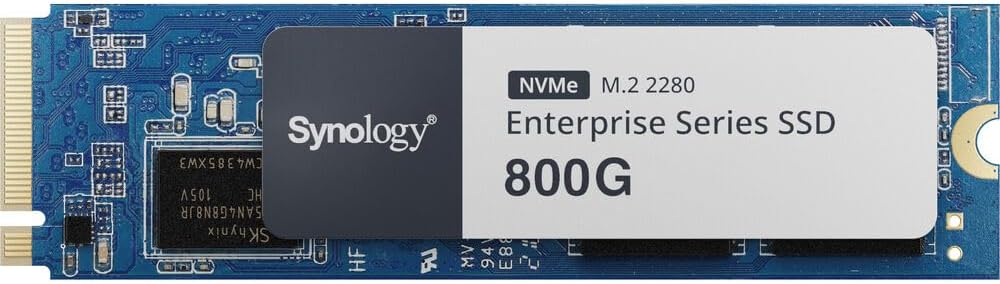
For 2025 Synology Plus models with strict M.2 rules, the Synology SNV5420-800G is the clean answer. Synology lists an NVMe PCIe 3.0 x4 interface, sustained speeds up to 3,000MB/s read and 1,000MB/s write, more than 1,400 TBW (rated with an enterprise workload), a 5-year warranty, and power loss protection with dedicated capacitors. DSM can also update its firmware directly.
✓ Pros
- ✓ Power loss protection for safer read-write caching
- ✓ More than 1,400 TBW on an 800GB drive
- ✓ Designed for Synology systems with in-DSM firmware updates
✕ Cons
- ✕ About $741, close to $930 per terabyte
- ✕ Low stock on the listing
- ✕ Little reason to buy it for a non-Synology NAS
Who it is for: DS925+ and other Synology owners who want a supported cache or M.2 pool, and anyone who wants power loss protection in a mirrored read-write cache. Price per TB: about $926. The smaller SNV5420-400G exists too, but its current third-party listing is not much cheaper.
Best Gen4 NAS Drive for a Small Cache: Seagate IronWolf 525 500GB
The Seagate IronWolf 525 500GB is Seagate's NAS-branded NVMe drive. Seagate's datasheet lists PCIe Gen4 x4 (NVMe 1.3), 3D TLC NAND, M.2 2280, 700 TBW for the 500GB model, a 1.8 million hour MTBF rating, a 5-year limited warranty, and 3 years of Rescue data recovery service. That recovery plan is unusual on an SSD and is a real plus if a cache drive fails with data on it.
✓ Pros
- ✓ 700 TBW on a 500GB drive, a high rating for the size
- ✓ 5-year warranty plus 3 years of data recovery service
- ✓ NAS-focused firmware and branding
✕ Cons
- ✕ About $200 for 500GB from a third-party seller
- ✕ Sustained write speed on the 500GB model is modest
- ✕ No power loss protection
Who it is for: owners of 2-bay and 4-bay boxes who want a pair of small, NAS-rated cache drives and do not need a big pool. Price per TB: about $400. A 500GB cache is plenty for most home NAS read caching.
Best Budget Read Cache: Kingston NV3 1TB
The Kingston NV3 1TB is here for one job: an inexpensive read-only cache. Kingston lists PCIe 4.0 x4, up to 6,000MB/s read, 320 TBW for 1TB, and a 5-year limited warranty. It is a DRAM-less design, and Kingston only specifies the NAND as "3D", so the exact type can vary. It is sold by Amazon at about $157 with a 4.7-star average across more than 14,000 ratings.
✓ Pros
- ✓ About $157 per terabyte, the lowest here
- ✓ 5-year warranty from a large brand
- ✓ Fine for a read cache that rarely writes
✕ Cons
- ✕ 320 TBW, too light for a read-write cache
- ✕ DRAM-less, so sustained mixed I/O is less consistent
- ✕ Kingston positions it for desktops and laptops
Who it is for: a read cache on a home NAS where the goal is snappier browsing of photos and shared folders. Skip it for read-write caching, VM pools, or a TrueNAS SLOG.
Comparison
| Drive | Capacity | Interface | DRAM | Rated TBW | Power loss protection | Warranty | Approx. price per TB |
|---|---|---|---|---|---|---|---|
| Samsung 990 PRO | 1TB | PCIe 4.0 x4 | LPDDR4 | 600 | No | 5 years | ~$240 |
| WD Red SN700 | 1TB | PCIe 3.0 x4 | DDR4 | 2,000 | No | 5 years | ~$500 |
| Synology SNV5420 | 800GB | PCIe 3.0 x4 | Not listed | More than 1,400 | Yes | 5 years | ~$926 |
| Seagate IronWolf 525 | 500GB | PCIe 4.0 x4 | Not listed | 700 | No | 5 years | ~$400 |
| Kingston NV3 | 1TB | PCIe 4.0 x4 | None (HMB) | 320 | No | 5 years | ~$157 |
How to Set Up a Cache Without Regret
Start with a read cache. It is safe, it shows you whether caching helps your workload at all, and you can remove it any time.
Mirror any read-write cache. Use two identical drives in RAID 1, and put the NAS on a UPS so a power cut does not catch unflushed writes. Drives with power loss protection reduce that risk further.
Size it to the hot data, not the whole array. A few hundred gigabytes covers most home read caching. Bigger caches also use more NAS memory for their mapping tables on some systems.
On TrueNAS, know the jobs apart. An L2ARC is a read cache and is usually only worth adding after the system has as much RAM as it can take. A SLOG speeds up sync writes and is the one place power loss protection matters most. Our ZFS entry explains the pieces.
Watch wear. Check the drive's SMART wear indicator in your NAS storage manager every few months, especially on a read-write cache.
The Bottom Line
For most NAS owners whose M.2 slots accept third-party drives, buy a pair of Samsung 990 PRO 1TB drives: DRAM, 600 TBW, and a fair price from Amazon. If you plan heavy read-write caching or a VM pool, the WD Red SN700 1TB has far more endurance, and the Seagate IronWolf 525 500GB is a smaller NAS-rated option with a data recovery plan. On a 2025 Synology Plus model, go straight to the Synology SNV5420-800G, which also adds power loss protection. And if all you want is a cheap read cache, the Kingston NV3 1TB does that job for the least money.
Still choosing the NAS itself? Compare two popular 2-bay boxes in Synology DS224+ vs UGREEN NASync DXP2800: Which 2-Bay Home NAS? and read our TerraMaster F2-425 Review. For a desktop or laptop SSD instead of a NAS drive, see Samsung 990 EVO Plus vs WD Black SN7100: Which 2TB NVMe SSD?.


