If your NAS is holding the only copy of ten years of photos, or your router is the thing that keeps a security camera recording, "put it on a battery backup" is not optional advice, it is a missing step. The problem is that most buying guides stop at that sentence. They hand you a VA number tied to bay count and move on, without telling you what your NAS, router, modem, and switch actually draw together, how many real minutes that buys you, or how to make the NAS shut itself down cleanly instead of just dying when the battery runs out. This guide covers all three: sizing, runtime at a realistic load, and the automatic shutdown setup that makes a UPS more than an expensive surge protector.
What to Look For
Size it by what your gear actually draws, not by bay count. Every generic chart pairs "1-2 bay NAS" with a VA tier and stops, which ignores that most people want one UPS covering the whole shelf: NAS, router, cable modem, switch, and sometimes a PoE access point. Add up the rated wattage printed on each device's power brick or label, not a guess. A 2-bay NAS with two spinning drives typically pulls 20-30W; a 4-bay unit with four drives runs 40-60W under load. A router and modem are usually 10-15W each, and an unmanaged switch is 5-10W (a PoE switch feeding an access point can add 15-30W more). Total that up, then multiply by roughly 1.3-1.5 for headroom, since spin-up current spikes higher than steady-state draw and you'll likely add a device later. For most NAS-plus-network shelves, that lands in the 50-110W real-world range, far below the 300-500W people picture when they see a "1500VA" label. Buy for the wattage figure, not the VA number, since VA overstates what a UPS can actually deliver to a non-unity-power-factor load like a switching power supply.
Runtime claims mean little unless the load matches yours. Manufacturers publish runtime at a generic 100W or half-load test point, and a real NAS-plus-network shelf usually draws less than that, so real runtime is typically longer than the spec sheet implies. The one exception worth calling out: APC publishes a 100W data point for the BX1500M, 68 minutes, which is close enough to a real combined load to use as an actual buying signal instead of a guess.
Pure sine wave matters if your NAS or PC uses an active-PFC power supply. Most current NAS units and desktop PSUs do. On battery power, a stepped or "simulated" sine wave UPS can cause an active-PFC supply to hum, throw a fault, or in some cases shut down instead of riding through the outage. Pure sine wave costs more, but it is the safer default if you don't know your NAS's PSU type.
Automated shutdown is what turns a UPS from insurance into protection. A NAS that loses power mid-write risks a corrupted filesystem or a failed RAID rebuild, so the goal is a graceful shutdown before the battery empties, ideally with the NAS shutting down before the router drops so you don't lose remote visibility mid-sequence. Every unit here connects over USB to trigger this, but the software path differs: Synology and QNAP both have native UPS support in their DSM/QTS settings that talks to a directly connected UPS over USB using the NUT protocol, no extra install required. For APC units, the bundled PowerChute software doesn't officially list NAS operating systems as supported, so plenty of owners run open-source apcupsd or NUT instead, which is a config-file job, not a GUI installer. Budget a real chunk of time for this step regardless of which UPS you buy.
Outlet topology and battery replacement are the two things people forget to check. Every unit here splits its outlets into battery-backed (for the NAS, router, modem, switch) and surge-only (for anything that doesn't need runtime, like a printer or a lamp), and the battery-backed count is the real ceiling on how much gear you can protect, not the total outlet count. Separately, every lead-acid UPS battery degrades and needs replacing every 3-5 years, a recurring $30-60+ cost that's easy to forget when comparing sticker prices. If the unit will live in a bedroom or home office, also check for audible alarm complaints. Several models here can be muted, but owners report the alarm resetting to on after a firmware update or a power event.
The Picks
Best Overall: CyberPower CP1500PFCLCD
The CyberPower CP1500PFCLCD is the price-to-performance benchmark in this category for a reason: true pure sine wave output and a 1000W ceiling for about $209.99, where a comparable APC Smart-UPS with the same waveform and wattage typically runs $400-500 or more. It has 12 total outlets, 6 battery-backed and 6 surge-only, more than any other unit here, which matters once you're covering a NAS, router, modem, and switch on the same shelf. With well over 11,000 Amazon reviews, the complaint pattern is consistent and not about power delivery: the audible alarm is loud enough to notice in a quiet home office, and some owners report it resets to on after a firmware update or power event even after muting it. This is the pick if you want headroom to add gear later without stepping up to Smart-UPS pricing. PowerPanel Business software supports scripted graceful shutdown over USB, and the 3-year warranty includes the battery itself.
✓ Pros
- ✓ True pure sine wave at a mid-tier price, matched only by units costing $400-500+
- ✓ 12 total outlets, the most in this roundup
- ✓ Tilting color LCD stays readable on the floor next to a NAS
- ✓ PowerPanel Business software supports scripted USB shutdown
- ✓ 3-year warranty including the battery
✕ Cons
- ✕ Audible alarm is loud enough to notice in a quiet room and can reset itself back on
- ✕ Mini-tower chassis is heavy and awkward to relocate
- ✕ Replacement battery (RB1290X2) is a recurring cost every 3-5 years
- ✕ 1000W ceiling is easy to exceed once a multi-bay NAS, switch, and modem are all plugged in
Best for NAS Auto-Shutdown: APC Back-UPS Pro BX1500M
The APC Back-UPS Pro BX1500M wins on runtime per dollar: APC's own spec is 68 minutes at a 100W load and 19 minutes at 300W, both longer than anything else in this lineup at a comparable price point. It has a dedicated USB data port built specifically to trigger automated shutdown, and at about $169.99 it's the second-cheapest unit here. The catch is that it ships with stepped sine wave, not pure sine, and APC's own PowerChute software doesn't officially support NAS operating systems, so most owners script the shutdown themselves with open-source apcupsd or NUT rather than relying on the bundled app. A stepped waveform can cause humming or shutdown faults on a NAS with an active-PFC supply, so check your NAS's PSU spec before buying this one over a pure sine wave option. One other recurring complaint: after a PowerChute-triggered shutdown, some users report the unit unexpectedly powers back on and starts booting again about 45 seconds later.
✓ Pros
- ✓ Longest real-world runtime here: about 68 minutes at 100W, 19 minutes at 300W
- ✓ Dedicated USB data port built for automated NAS/server shutdown
- ✓ ENERGY STAR-certified AVR keeps the unit on line power through minor brownouts
- ✓ User-replaceable battery and a $75,000 Connected Equipment Guarantee
- ✓ 10 outlets (5 battery-backed, 5 surge-only) to spread gear across protected circuits
✕ Cons
- ✕ Stepped/simulated sine wave, not pure sine, can cause issues on active-PFC NAS supplies
- ✕ PowerChute doesn't officially support NAS/Linux operating systems, so most owners use apcupsd or NUT instead
- ✕ Some users report the unit unexpectedly reboots about 45 seconds after a triggered shutdown
- ✕ Heavy (24.25 lbs) and deep (15 in), so it won't fit every shelf
Best Premium / USB-C: APC Back-UPS Pro BR1500MS2
The APC Back-UPS Pro BR1500MS2 pairs pure sine wave with a USB-C PD charging port, unusual at this price, and it's the pick most often recommended when APC's PowerChute Network Shutdown ecosystem matters to you, since it has documented, well-trodden Synology NAS integration. At about $239.99 it's the most expensive unit here, and its 900W ceiling is lower than the 1500VA rating suggests, so headroom is tighter than the number implies. One thing to check before buying: this model family (BR1100M2/BR1350M2/BR1500M2) has a documented F02 error, an early-failure issue that Schneider Electric traced to a firmware defect in the first battery-transfer cycle, with reports of early units popping or smoking within weeks. Register the unit after purchase and confirm you're on corrected firmware. Some reviewers also report coil whine from the charging circuit under certain loads.
✓ Pros
- ✓ True pure sine wave, safe for NAS and PC supplies with active PFC
- ✓ USB-C PD charging port alongside USB-A, unusual on a UPS at this price
- ✓ Fast 6-10ms typical transfer time to battery
- ✓ Documented, well-trodden PowerChute Network Shutdown integration for Synology NAS
- ✓ User-replaceable battery and LCD status display
✕ Cons
- ✕ Documented F02 error / early-failure issue on this model family, traced to a firmware defect; register and check firmware after purchase
- ✕ Some reviewers report coil whine from the charging circuit under certain loads
- ✕ Priced noticeably higher than the CyberPower CP1500PFCLCD for similar VA/W specs
- ✕ 900W ceiling is lower than the 1500VA rating suggests
Best for Single-Bay NAS: CyberPower CP850PFCLCD
The CyberPower CP850PFCLCD is the cheapest way to get genuine pure sine wave in this roundup, at about $139.99, which matters because plenty of single-bay NAS units and small PC power supplies use active PFC and can hum or error out on a stepped waveform. Its own spec sheet shows about 9 minutes of runtime at half load and roughly 3 minutes at full load, which tells you its actual job: give a single-bay NAS just enough time to trigger a clean shutdown, not ride out a long outage. This is right-sized for one NAS plus a router, not a full shelf of gear. It still carries 10 outlets (5 battery-backed, 5 surge-only) and a 3-year warranty including the battery. The most common complaint isn't the power delivery, it's slow warranty and RMA response reported by some buyers. For more compact, single-NAS-desk picks under $150, see Best Compact UPS Units Under $150 for a Desk NAS in 2026.
✓ Pros
- ✓ Pure sine wave at the lowest price point that offers it here
- ✓ 10 outlets, generous for an 850VA unit
- ✓ Tilting color LCD and mutable AVR
- ✓ PowerPanel software supports automated shutdown signaling over USB
- ✓ 3-year warranty including the battery
✕ Cons
- ✕ Short runtime by design: about 9 minutes at half load, ~3 minutes at full load
- ✕ Some reviewers report slow warranty/RMA response times
- ✕ 12V/8.5Ah battery needs replacement every 3-5 years
- ✕ 510W ceiling is tight once a NAS, switch, and modem all share the unit
Best Budget: APC Back-UPS BE600M1
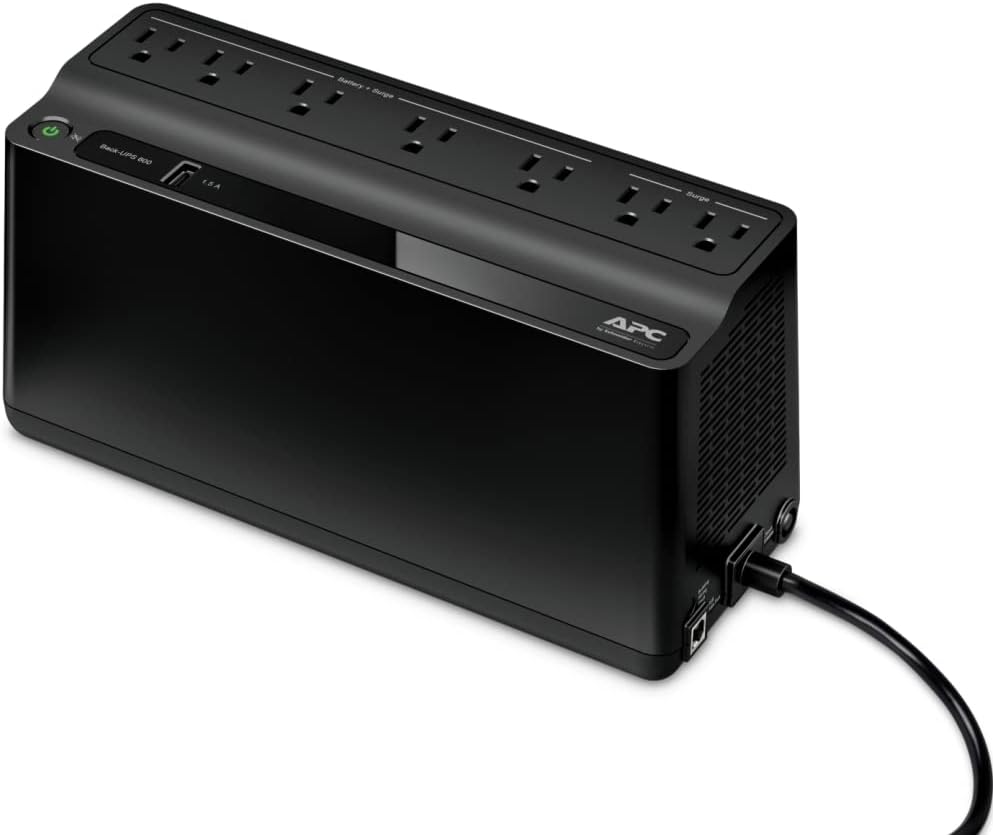
The APC Back-UPS BE600M1 is the cheapest entry point here, usually well under $70, and it earns its budget spot keeping a router, modem, and switch alive through a short blip rather than carrying an actual NAS through a graceful shutdown. APC's own spec is about 23 minutes at a 100W load, which a spinning-drive NAS can burn through fast, and it has no AVR and a simulated sine output; its USB data port targets PowerChute on Windows, and NAS shutdown support varies by model. Reviewers who buy this one commonly pair it with a separate, larger unit dedicated to the NAS itself, using this for the network stack only. Its compact footprint (10.8 x 4.1 x 5.5 in, 7.7 lbs) tucks behind a router easily, though the outlet strip is rotated 90 degrees relative to most power strips, a recurring complaint since bulky wall-wart adapters block adjacent outlets.
✓ Pros
- ✓ Cheapest entry point, usually well under $70
- ✓ Compact footprint fits behind a router or modem easily
- ✓ USB-A port charges a phone at up to 1.5A during an outage
- ✓ 7 outlets (5 battery-backed, 2 surge-only) covers a full network stack
- ✓ 3-year warranty and a $75,000 Connected Equipment Guarantee
✕ Cons
- ✕ No USB data port for automated NAS shutdown signaling
- ✕ ~23 minutes of runtime at 100W, which a NAS can burn through quickly
- ✕ Stepped/simulated sine wave, not pure sine
- ✕ Outlet strip's 90-degree rotation means bulky adapters can block adjacent outlets
How They Compare
| Model | Capacity | Waveform | Battery outlets | Runtime (real-world data point) | Price |
|---|---|---|---|---|---|
| CyberPower CP1500PFCLCD | 1500VA / 1000W | Pure sine | 6 of 12 | ~9 min at 500W (half load) | $209.99 |
| APC Back-UPS Pro BX1500M | 1500VA / 900W | Stepped sine | 5 of 10 | 68 min at 100W, 19 min at 300W | $169.99 |
| APC Back-UPS Pro BR1500MS2 | 1500VA / 900W | Pure sine | n/a (10 total) | Not published at low load | $239.99 |
| CyberPower CP850PFCLCD | 850VA / 510W | Pure sine | 5 of 10 | ~9 min half load, ~3 min full load | $139.99 |
| APC Back-UPS BE600M1 | 600VA / 330W | Stepped sine | 5 of 7 | ~23 min at 100W | $64.99 |
| Attribute | CyberPower CP1500PFCLCD PFC Sinewave UPS (1500VA/1000W) | APC Back-UPS Pro BX1500M (1500VA/900W) | APC Back-UPS Pro BR1500MS2 Pure Sine Wave UPS (1500VA/900W) | CyberPower CP850PFCLCD PFC Sinewave UPS Battery Backup and Surge Protector, 850VA/510W | APC Back-UPS BE600M1, 600VA/330W Battery Backup and Surge Protector |
|---|---|---|---|---|---|
| Rating | 4.7 | 4.6 | 4.6 | 4.4 | 4.6 |
| Price | Not listed | Not listed | Not listed | $139.99approx. · checked Aug 2026 | $64.99approx. · checked Aug 2026 |
| Capacity | 1500VA / 1000W | 1500VA / 900W | 1500VA / 900W | 850VA / 510W | Not listed |
| Waveform | Pure sine wave (line interactive, AVR) | Stepped approximation to sine (line interactive, AVR) | Pure sine wave (line interactive, AVR) | Pure sine wave (PFC-compatible) | Not listed |
| Runtime | 10 min at 500W half load, 2.5 min at full 1000W | 68 min at 100W, ~19 min at 300W | Up to 73 min at 100W | ~9 min half load, ~3 min full load | Not listed |
| Outlets | 12 NEMA 5-15R (6 battery + surge, 6 surge-only) | 10 NEMA 5-15R (5 battery + surge, 5 surge-only) | 10 NEMA 5-15R (6 battery + surge, 4 surge-only) | 10 total (5 battery+surge, 5 surge-only) | Not listed |
| Transfer time | 4 ms | 8 ms typical | Not listed | Not listed | Not listed |
| Data port | USB HID (NAS/PC auto-shutdown) + serial | USB (PowerChute) | USB (PowerChute / NAS auto-shutdown) | Not listed | Not listed |
| Charging ports | USB-A + USB-C | Not listed | USB-A + USB-C, 3A total | Not listed | Not listed |
| Dimensions / weight | 14.0 x 3.9 x 11.0 in, 24.9 lb | Not listed | Not listed | Not listed | Not listed |
| Warranty | 3 years including batteries, $500,000 CEG | 3 years | Not listed | Not listed | Not listed |
| Battery | Not listed | User replaceable (APCRBC124) | User replaceable | User-replaceable 12V/8.5Ah | Not listed |
| Extras | Not listed | Not listed | Coax + Ethernet surge protection, LCD | Not listed | Not listed |
| Weight / dimensions | Not listed | Not listed | Not listed | 14.9 lbs / 3.9 x 9.7 x 10.2 in | Not listed |
| Buy | View on Amazon | View on Amazon | View on Amazon | View on Amazon | View on Amazon |
The Bottom Line
For most people covering a NAS plus a full network stack, the CyberPower CP1500PFCLCD is the right default: pure sine wave, a 1000W ceiling, and the most outlets here for a price that undercuts comparable APC Smart-UPS units by hundreds of dollars. If your priority is the longest possible runtime and you don't mind setting up apcupsd or NUT yourself, the APC Back-UPS Pro BX1500M gets you 68 minutes at a realistic load for less money, at the cost of a stepped waveform. If you're specifically on Synology's PowerChute-integrated ecosystem and want USB-C, the APC Back-UPS Pro BR1500MS2 is the pick, but register it and confirm current firmware given the documented early-failure reports on this model family. A single-bay NAS with a router doesn't need 1500VA: the CyberPower CP850PFCLCD gives you clean pure sine wave for less. And if all you need is to keep the internet up during a blip while a bigger unit handles the NAS separately, the APC Back-UPS BE600M1 is the cheapest way to do that. Whichever you buy, don't stop at the purchase: go into your NAS's UPS settings (or install apcupsd/NUT) and actually configure the shutdown trigger, since an unplugged battery backup only buys you time, not protection.