

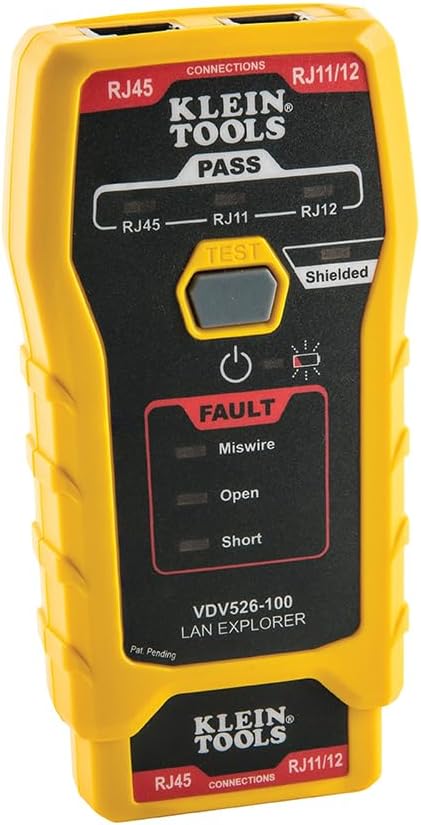
If you crimp your own Ethernet plugs or punch down your own keystone jacks, sooner or later one run will not link, or will link at 100 Mbps instead of gigabit, and you will need to know whether the problem is the cable or the gear. The Klein Tools VDV526-100 LAN Explorer is the tool most DIY installers reach for first: a pocket continuity tester with a detachable remote that checks a terminated cable end to end and answers with a few LEDs. As of October 2026 it sells for $21.00 on Amazon, with about 4.7 stars across roughly 2,500 ratings.
This review is spec and source grounded. The details come from Klein's product page and instruction manual, the Amazon listing, and recurring themes in published reviews and buyer feedback. It covers what the tester actually catches, what it cannot tell you, how the remote works on an in-wall run, and when the pricier Scout Pro 3 is the better buy.
Who it is for, and who needs something else
A good fit:
- Homeowners and renters wiring a few rooms with their own plugs and keystone jacks
- Home lab builders making custom-length patch cables for a rack or a desk switch
- Anyone who keeps a box of mystery patch cables and wants to sort good from bad in seconds
- People who already own a crimper and want the inexpensive tool that tells them if the crimp worked
Look elsewhere if:
- You are documenting a whole house of existing runs and need to know which jack lands on which switch port. That is a job for a tester with numbered location remotes
- You need cable length, for example to find how far into a wall a break sits
- You are signing off a business install that must be certified for Cat6 or Cat6A performance
- You only ever plug in factory-made patch cables. Those rarely fail, and swapping in a known good cable is free
What it is and what is in the box
The VDV526-100 is a yellow, pocket-size tester with two ports on top (RJ45 for data, RJ11/RJ12 for phone) and a matching remote that clips into the bottom of the body for storage. You plug one end of a cable into the main unit, the other end into the remote, and press the single Test button. LEDs on the face report the result, and the tester powers itself off 30 seconds after the last result change. Holding the button for two seconds turns it off manually.
In the box you get the tester, the remote, and a 9V battery. A replacement remote (Klein part VDV999-150) is sold separately if you lose the original.
| Spec | Klein Tools VDV526-100 |
|---|---|
| Connectors tested | RJ45, RJ11, RJ12 |
| Cable types | Cat3, Cat5e, Cat6/6A (manual also lists Cat7), shielded or unshielded |
| Results shown | Pass (RJ45, RJ11, RJ12), Shielded, Miswire, Open, Short, low battery |
| Maximum cable length | 1,000 ft (305 m) |
| Split pair detection | Runs of at least 1.5 ft (0.5 m) |
| Display | LEDs only |
| Length measurement | No |
| Tone generator | No |
| Battery | One 9V, included; Klein rates about 80 hours active, 3.5 years standby |
| Size and weight | 4.9 x 2.5 x 1.3 in; 5.0 oz with battery and remote |
| Drop rating | 2 ft (0.6 m) |
| Voltage tolerance | Up to 66V DC or 55V AC between pins without damage; built for unpowered cable |
What it catches, in plain terms
An Ethernet cable has eight small wires twisted into four pairs. The T568A and T568B standards set which color goes on which pin, and the tester compares the near end against the far end.
- Open. A wire that does not make it from one end to the other. This is the classic bad crimp, where a conductor stopped short of the gold contact, or a keystone wire that was not seated deep enough in the punch-down slot. The Open LED lights.
- Short. Two wires touching where they should not, often from a nicked jacket or a crushed plug. The Short LED lights.
- Miswire. The wires arrive on the wrong pins, for example pin 1 on one end landing on pin 2 at the other, or one end done to T568A and the other to T568B. The Miswire LED lights. A deliberately wired crossover cable flashes Miswire and Pass together, which is how the manual tells you it is a crossover rather than a mistake.
- Split pair. The sneakiest fault. Every pin connects to the matching pin, so a basic continuity check looks perfect, but the wires were paired wrong, so two signals share a twist they should not. Split pairs often still link but drop to slow speeds or throw errors. Klein lists split pair detection for runs of 1.5 ft or longer, which is the main reason to buy this tester over a no-name model that only checks pin to pin continuity.
- Shield. On shielded cable, the Shielded LED confirms the foil or drain wire connects at both ends.
When more than one fault is present, the manual explains that Open and Short take priority over Miswire, so fix the open or short first and test again.
What it cannot do, and why that matters
This is the section most buyers skip, and it is the one that causes disappointment.
- No speed certification. A Pass means the wiring is correct and continuous. It does not measure crosstalk, return loss, or bandwidth, so it cannot prove a run will carry 2.5, 5, or 10 Gbps. Only a certifier costing thousands of dollars does that. For a home, the practical speed test is plugging both ends into real gear and confirming the link rate.
- No pin map. The LEDs say Miswire or Open, not which wire. On a fresh crimp that is fine, because you usually redo the plug anyway. On a finished wall jack you have to inspect each end by eye.
- No length. It cannot tell you how long a run is or how far away a break sits.
- No tone or port finding. There is no tone generator and no way to blink a switch port, so it will not help you trace an unlabeled cable through a wall.
- Not for live ports. Klein designs it for unpowered cable and warns against connecting it to live AC power. Unplug the run from your switch, router, and any PoE device before testing. If you are wiring PoE cameras or access points, see our guide to PoE and test the cable before anything is powered.
Testing a wall plate run with the remote
The remote is what makes this useful for in-wall cable, not just patch cords. Following the manual, the workflow on a finished run looks like this:
- Unplug both ends of the run from any network gear.
- Pop the remote off the bottom of the tester.
- At the far end, plug a short known good patch cable into the wall jack and into the remote. If the run ends at a patch panel, do the same at the panel port.
- At the near end, connect another known good patch cable from the matching jack to the tester's RJ45 port.
- Press Test and read the LEDs.
A Pass covers the whole chain, including both patch cords and both jacks. If you get a fault, swap the patch cords for others you trust before blaming the in-wall cable or the keystone. Doing this before you mount faceplates saves a second trip into the wall. If you are building out a closet, our home network rack kit shows how the patch panel side fits together.
✓ Pros
- ✓ Detects opens, shorts, miswires, and split pairs on RJ45, RJ11, and RJ12 cable
- ✓ One-button test with clear Pass and Fault LEDs, no menus to learn
- ✓ Remote stores in the tester body so it is hard to lose
- ✓ Runs up to 1,000 ft, which covers any home run
- ✓ About $21 on Amazon, with roughly 2,500 ratings averaging 4.7 stars
✕ Cons
- ✕ No pin by pin map, so it will not say which wire is wrong
- ✕ No length measurement, tone, or port finding
- ✕ Cannot certify speed; a Pass is not proof of 10 Gbps
- ✕ The manual warns that a badly crimped plug can damage the tester jacks, so inspect every plug before testing
Compared with the Scout Pro 3 and cheap no-name testers
Against the Klein Scout Pro 3. The Klein Tools VDV501-851 Scout Pro 3 Tester Starter Kit is the step up, listed at $99.98 on Amazon with about 4.7 stars across roughly 2,500 ratings. It adds a backlit LCD with a full wiremap, cable length up to 2,000 ft, coax F-connector testing, a tone generator (the probe is sold separately), a hub blink mode to find which switch port a cable lands on, and five LanMap plus five CoaxMap location remotes, so you can identify several runs from one spot. If you are mapping an existing house full of unlabeled jacks, that is worth the extra money. The Starter Kit listing also says it is not designed to test PoE.
| VDV526-100 | Scout Pro 3 Starter Kit | |
|---|---|---|
| Amazon price (Oct 2026) | $21.00 | $99.98 |
| Display | LEDs | Backlit LCD wiremap |
| Split pair detection | Yes | Yes |
| Cable length | No | Up to 2,000 ft |
| Coax testing | No | Yes |
| Tone generator | No | Yes (probe sold separately) |
| Location remotes | 1 | 1 plus 5 LanMap and 5 CoaxMap |
Against cheap no-name testers. The basic testers that step through pins 1 to 8 with blinking lights will catch opens and obvious miswires, and they usually cost less than the Klein. The usual gap is split pairs: a sequential pin tester sees every pin connected to its partner and reports a pass. For checking a single patch cable, a cheap tester is fine. For a whole house of fresh terminations, the VDV526-100's split pair check is the reason to spend a little more.
Pair it with the right crimper
Most bad results come from the termination, not the cable. Pass-through RJ45 plugs, where the wires poke out of the front so you can confirm color order before crimping, cut down on miswires. The Klein Tools VDV226-110 ratcheting crimper is built for Klein's pass-through plugs and trims the wires flush as it crimps. It is $49.97 on Amazon with about 4.8 stars across more than 11,000 ratings.
If you are still choosing cable, our Cat6 vs Cat6a cable guide and the Cat6a explainer cover which one makes sense for multi-gig, and the apartment Ethernet backhaul kit covers renters who would rather buy finished cables than terminate their own.
Who should skip it
Skip the VDV526-100 if you never terminate cable yourself, if you need length or port mapping, or if a client needs a certification report. In the first case, a known good spare patch cable is the only test you need. In the other two, go straight to the Scout Pro 3 or a professional certifier.
Bottom line
The Klein Tools VDV526-100 does one job well: it tells you, in a second, whether a home Ethernet run or patch cable is wired correctly, including the split pairs that cheap testers miss. At about $21 it costs less than the time you would lose chasing one bad keystone. Just remember its limits. A Pass means the wiring is right, not that the run is certified for multi-gig, and when a run does fail it will not tell you which wire to fix. For that, and for mapping a house full of unlabeled jacks, the Scout Pro 3 earns its higher price.


