
A flat keyboard keeps wrists twisted and shoulders pulled inward for hours of Slack, docs, and code. This roundup covers split and ergonomic keyboards that change that geometry: wave or tented boards for a soft first step, fixed curved splits for all-day office work, and true two-module splits (membrane or mechanical) when shoulder width matters. It is distinct from Best Budget Mechanical Keyboards Under $100, which stays on conventional 75 percent and TKL boards. Pair a new board with a handshake mouse from Best Vertical Mice in 2026, or place the upgrade in order with Ergonomic Upgrades Ranked by Impact. Creator desks can borrow layout ideas from Streaming Desk Three Budgets and cable cleanup from Cable Management Kit for Dual Monitor WFH.
What to Look For
Split type. If shoulders ache, prioritize true separation. If only wrists complain and you hate weird boards, start with Wave Keys or K860.
Tenting and negative tilt. Raising the center or dropping the front edge reduces extension. K860 legs and Freestyle tenting kits matter more than RGB.
Key feel and firmware. Membrane Freestyle2 and K860 need almost no hobby time. Q11 and Freestyle Edge reward people who will remap layers. Hot-swap only helps if you will actually change switches.
Wireless vs wired. Multi-device Bluetooth or Bolt is great for laptop plus desktop. Wired splits are simpler and often more stable for gaming or heavy macros.
Palm support. Integrated rest (K860, Wave Keys) beats a bare front edge for long writing days. Detachable Freestyle rests work when you tent.
Best Overall Fixed Split: Logitech ERGO K860
✓ Pros
✕ Cons
The K860 is the default recommendation for knowledge workers who want a clear ergonomic change without two modules sliding around the desk. The curved split and pillowed rest are the product; Perfect Stroke keys stay quiet enough for open offices. Easy-Switch covers a work PC, home laptop, and tablet. Choose something else if you need shoulder-width separation or mechanical hot-swap.
Best First-Step Wave: Logitech Wave Keys
✓ Pros
✕ Cons
Wave Keys is the low-risk experiment. The wave plus memory-foam rest improves posture while the layout stays familiar, and the compact width helps mouse reach. It will not fix pinched shoulders the way a Freestyle or Q11 can. Use it to learn whether ergo geometry helps before spending K860 or Q11 money.
Best Mechanical True Split: Keychron Q11
✓ Pros
✕ Cons
The Q11 is for people who already want mechanical switches and are willing to learn VIA layers. Aluminum halves can sit bridged like a 75 percent board or separated for shoulders. This assembled Red-switch SKU is wired; budget time for remaps and a cable path between modules. If you want Alice stagger in one chassis instead of two halves, look at Keychron Q10-class boards as a sibling path (not listed here because this shortlist stays on wave, fixed split, and true splits).
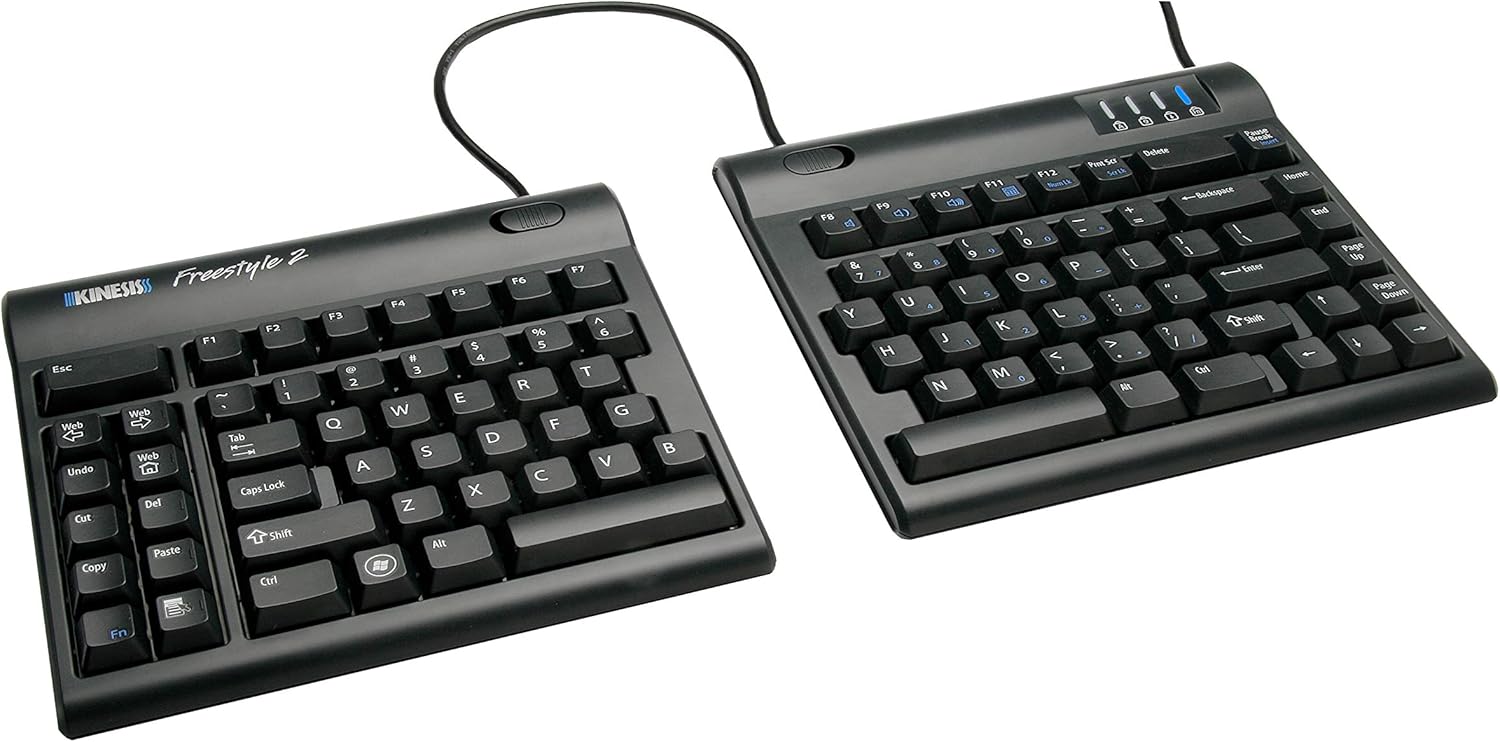
Best Adjustable Separation: Kinesis Freestyle2
✓ Pros
✕ Cons
Freestyle2 is the classic "push the halves under your shoulders" keyboard. The PC layout stays recognizable, the membrane switches are low force, and USB plug-and-play avoids firmware rabbit holes. Plan for a tenting kit if you want height, and confirm whether you need the longer separation cable. Skip it if you already know you want hot-swap mechanicals (Edge or Q11).
Best Programmable Freestyle: Kinesis Freestyle Edge
✓ Pros
✕ Cons
Freestyle Edge keeps the adjustable split idea but moves to mechanical switches with SmartSet onboard programming. It fits gamers and typists who want layers without a full QMK toolchain. Palm supports help during long sessions. Price sits near the Q11, so choose Edge for Freestyle geometry and SmartSet, or Q11 for aluminum VIA customization.
Comparison
| Pick | Geometry | Feel | Wireless | Best for |
|---|---|---|---|---|
| ERGO K860 | Fixed curved split | Quiet scissor/membrane | Bluetooth or Unifying | Default office upgrade |
| Wave Keys | Wave + palm rest | Scissor/plunger | Bluetooth or Logi Bolt | First ergo experiment |
| Keychron Q11 | True split halves | Hot-swap mechanical | Wired (this SKU) | Remappers who want aluminum |
| Freestyle2 | Adjustable true split | Low-force membrane | Wired USB | Shoulder-width without hobby firmware |
| Freestyle Edge | Adjustable true split | Mechanical + SmartSet | Wired USB | Programmable Freestyle path |
The Bottom Line
Start with geometry. Most people who only need less wrist extension should try Wave Keys or step straight to ERGO K860. When shoulders feel cramped on a fixed board, move to Freestyle2 or a mechanical true split like Q11 / Freestyle Edge. Give any new layout one to two work weeks before judging accuracy. Combine the keyboard with a vertical mouse and a saner desk layout rather than treating one peripheral as a full RSI cure.