


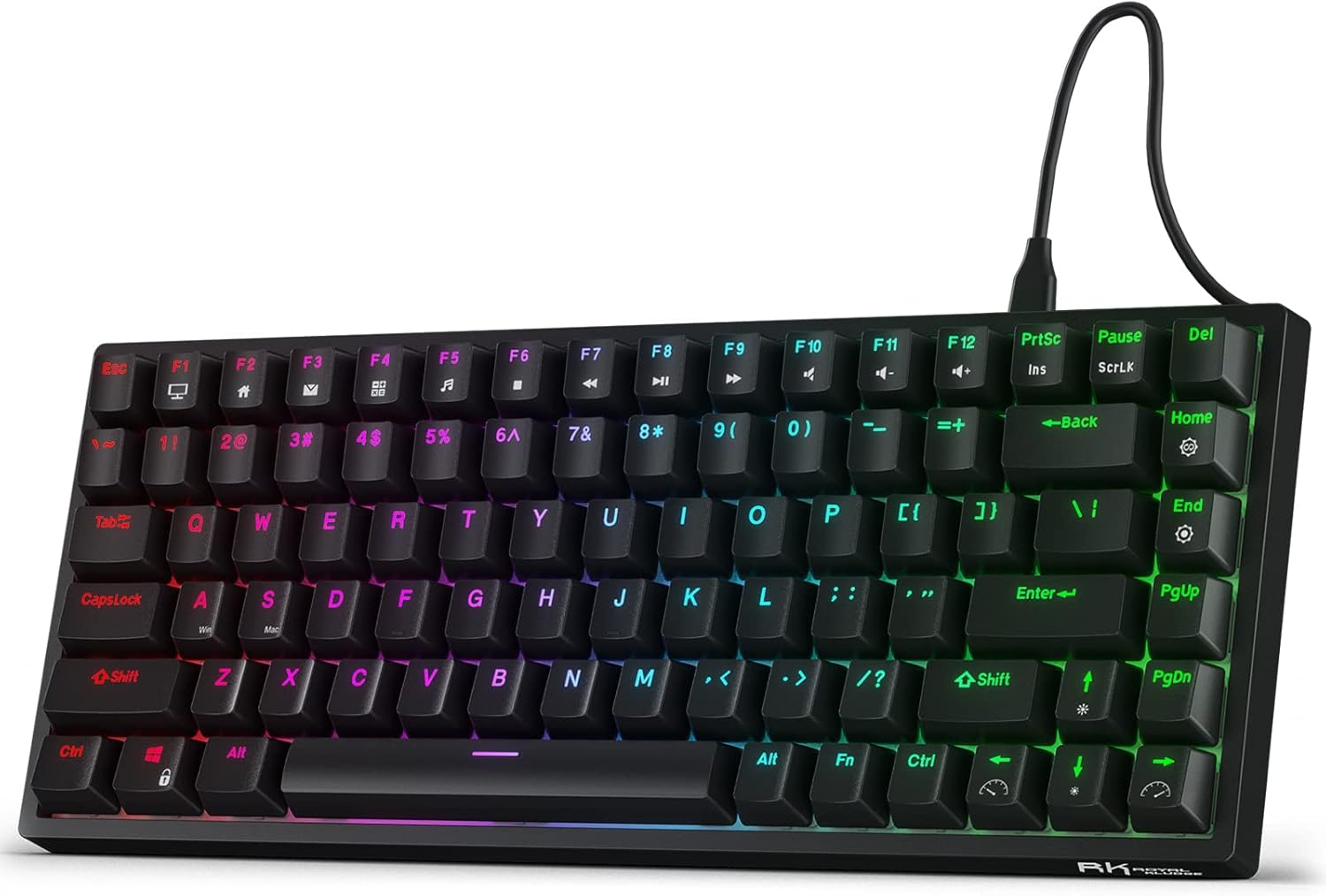

A mechanical keyboard under $100 gets you real, replaceable switches instead of the mushy rubber dome under most office keyboards, but it does not buy you the fit and finish of a $200 custom kit. We looked at five hot-swap capable boards that consistently sit under $100 on Amazon, compared their switch types, layouts, and stabilizer quality, and read through the recurring buyer complaints on each listing so you know what you are actually getting before the box shows up. None of these are silent-switch boards, none includes a numpad, and every single one has at least one build quirk worth knowing about first.
What to Look For
The switch is the single biggest factor in how a budget board feels and sounds, and it is worth understanding before layout or looks. Linear switches (like the Red switches in the Keychron V1) move straight down with no bump, so they are fast and quieter than clicky switches, which makes them the better default for gaming and for shared offices. Tactile switches (Brown, as on the Keychron C3 Pro) add a small bump you can feel without bottoming out, a middle ground most typists prefer. Clicky switches (Blue, used on the Redragon and Royal Kludge boards here) add an audible click on top of that bump, satisfying to type on but genuinely too loud for a shared desk.
Hot-swap sockets matter more on a budget board than on an expensive one, because the stock switches at this price are often the first thing to get replaced. A hot-swap PCB uses spring-loaded sockets instead of solder points, so you can pull a switch with an inexpensive puller and drop in a different one in seconds, no soldering iron required. Every board in this roundup is hot-swappable, which is exactly why they are worth buying over a cheaper soldered board: even if you dislike the stock switch, the board underneath it is still good.
Layout is the tradeoff most buying guides skip. None of the five boards here is full-size, so if you need a numpad for spreadsheet work, none of these is the right pick and you should look at a full-size hot-swap board instead. What you do get is a choice between TKL (87 keys, full arrow cluster and function row, no numpad) and 75% (81 to 84 keys, same functions crammed tighter to save desk space). TKL is the easier adjustment for anyone coming from a normal keyboard; 75% saves a few inches of desk depth at the cost of relearning where Delete and Home live.
Build quality at this price is inconsistent enough that it deserves its own line: stabilizers (the wire mechanisms under Shift, Enter, and the spacebar) are the single most common source of complaints across every board here, showing up as rattle or a hollow, tinny sound on the bigger keys. It is fixable with lube or tape on any of these, but you should know it is likely before you unbox one, not after.
1. Best Overall: Keychron V1 QMK/VIA
The Keychron V1 is the board reviewers keep pointing first-time buyers to, and the spec sheet explains why: factory-lubed hot-swap K Pro Red switches, screw-in stabilizers instead of the looser clip-in kind, double-shot PBT keycaps that will not go shiny in a few months, and full QMK/VIA firmware for real key remapping, all at a list price around $75 that regularly drops into the mid-$40s to mid-$60s on sale. It is a 75% layout at 81 keys, wired only, with a 1000Hz polling rate and an aluminum-reinforced tray-mount case that feels notably stiffer than the ABS-heavy boards further down this list.
The one recurring complaint is the stock spacebar stabilizer, which rattles noticeably out of the box even though the rest of the stabilizers are smooth. A drop of lube fixes it, but budget for that extra ten minutes if a quiet-out-of-the-box board matters to you. The 75% layout also takes real adjustment time if you are used to a standard keyboard, since navigation keys get compressed into a nonstandard arrangement.
✓ Pros
- ✓ Factory-lubed hot-swap switches and screw-in stabilizers, a genuine step up from clip-in budget boards
- ✓ Full QMK/VIA remapping and macros once flashed, no separate driver needed
- ✓ Double-shot PBT keycaps resist shine far longer than the ABS caps common at this price
- ✓ Aluminum-reinforced case feels sturdier than most boards under $100
✕ Cons
- ✕ Spacebar stabilizer rattles out of the box and needs lube or tape to quiet down
- ✕ 75% layout takes adjustment time if you are used to a full-size or TKL board
- ✕ No wrist rest, and less cushion than gasket-mounted rivals like the C3 Pro
- ✕ Wired only; wireless requires the pricier V1 Max
2. Best Ultra-Budget: Keychron C3 Pro
The Keychron C3 Pro is the cheapest board here that still pairs hot-swap sockets with QMK/VIA, listing around $37 and frequently discounted into the high $20s to low $30s. It uses a gasket-mount plate rather than the rigid tray mount on the Keychron V1, which gives it noticeably more bounce and give underhand, closer to what pricier custom boards feel like. It is an 87-key TKL layout with Brown tactile switches, and the 8K SKU runs an 8000Hz polling rate, unusually high for a board this cheap.
The Amazon listing sits at 4.4 stars from 931 ratings, and the recurring complaint is stabilizer rattle on the larger keys (Shift, Enter, spacebar) until you lube them. The stock switches themselves are also widely seen as the weakest part of the build, usable but not memorable, which matters less than it sounds since the sockets make swapping them trivial. It is wired only, and buyers need to check the listing carefully since non-8K SKUs drop RGB for single-color red backlighting.
✓ Pros
- ✓ Hot-swap sockets and full QMK/VIA at a genuinely entry-level price
- ✓ Gasket-mount plate gives more bounce than the rigid tray-mount boards on this list
- ✓ 8000Hz polling on the 8K SKU is unusual for a sub-$40 board
- ✓ Regularly discounted into the high $20s to low $30s
✕ Cons
- ✕ Larger keys wobble and rattle out of the box; lubing the stabilizers is a near-universal recommendation
- ✕ Wired only, no Bluetooth or 2.4GHz option
- ✕ Non-8K SKUs use single-color red backlighting instead of full RGB, easy to order the wrong variant
- ✕ Stock switches are the weakest part of the build, though hot-swap makes that easy to fix
3. Best for Gaming on a Budget: Redragon K552P
The Redragon K552P builds on Amazon's long-running best-selling budget mechanical keyboard by adding hot-swap sockets to the same steel-plated TKL frame, typically priced in the low to mid $40s. It ships with clicky Blue switches, full anti-ghosting, and N-key rollover, genuinely useful specs for gaming rather than marketing filler, and the steel top plate keeps the compact case rigid despite the price.
The most common complaint across reviews is the bundled Redragon software, which is buggy enough that installing it can break RGB and keyboard functionality until you reboot; most owners recommend skipping it entirely. The hot-swap sockets also use tight, Outemu-style housings that grip switches hard enough that a dedicated switch puller is close to mandatory, and the stock Outemu-clone switches feel scratchier than Cherry or Gateron equivalents, with some owners reporting individual keys failing to register after a year or two.
✓ Pros
- ✓ One of the cheapest ways to get hot-swap sockets on a mechanical board
- ✓ Steel top plate keeps the compact TKL case rigid for the price
- ✓ Full anti-ghosting and N-key rollover, genuinely useful for gaming
- ✓ 18 RGB backlight modes, bright and even across the keycaps
✕ Cons
- ✕ Bundled software is buggy and can break RGB or keyboard function until reboot; most owners skip it
- ✕ Tight Outemu-style hot-swap sockets make a switch puller close to mandatory
- ✕ Stock switches feel scratchier than Cherry or Gateron equivalents, and some keys fail to register after a year or two
- ✕ No wrist rest, and stock ABS keycaps show finger shine within a few months
4. Best Compact 75% Layout: Royal Kludge RK84
The Royal Kludge RK84 undercuts the Keychron V1 on price, typically running $55 to $70 with the on-page Amazon coupon, while keeping the same 84-key, numpad-less 75% formula and hot-swap sockets. It runs clicky RK Blue switches, bright and evenly-lit per-key RGB, and a detachable USB-C cable that makes cable swaps and storage simple.
Reviewers, including Tom's Hardware, consistently flag that the switches and stabilizers ship completely unlubed from the factory, giving a hollow, rattly sound until you mod them yourself. That is a bigger gap out of the box than the Keychron V1's single rattling stabilizer. The companion software is also widely described as clunky and dated next to QMK/VIA boards, several reviewers report the spacebar occasionally double-registering on light presses, and the mostly-ABS case flexes more than the aluminum-reinforced Keychron boards on this list.
✓ Pros
- ✓ Hot-swap sockets on a numpad-less 75% layout that saves real desk space
- ✓ Bright, evenly-lit per-key RGB with software customization
- ✓ Detachable USB-C cable simplifies storage and cable replacement
- ✓ One of the cheapest hot-swap 75% boards available, a reasonable first-mod platform
✕ Cons
- ✕ Switches and stabilizers ship completely unlubed, giving a hollow, rattly sound until modded
- ✕ Companion software is clunky and dated compared to QMK/VIA competitors
- ✕ Some reviewers report the spacebar occasionally double-registering on light presses
- ✕ Mostly ABS case flexes more than the aluminum-reinforced boards on this list
5. Best Wireless: Epomaker TH80 Pro
The Epomaker TH80 Pro is the only board here with real wireless, pairing hot-swap sockets with tri-mode connectivity (2.4GHz, Bluetooth 5.0, or wired USB-C) and a 4000mAh battery, at a list price around $90 that dips into the $50 to $70 range on periodic promotions. It is an 81-key 75% layout with a rotary knob for volume, PBT dye-sublimated keycaps that resist shine noticeably better than the ABS caps common on other budget wireless boards, and south-facing sockets that stay compatible with most aftermarket keycap sets.
Multiple reviewers specifically call out that the stabilizers ship factory-lubed with no rattle even when shaking the board, the only board on this list reviewers describe that way out of the box. Epomaker does not publish one battery-runtime number that holds across settings, and for good reason: RGB brightness drains a wireless board fast on any brand, so treat the 4000mAh cell as strong reserve capacity rather than a fixed hours figure, and expect noticeably shorter stretches between charges if you run the backlight at full brightness. The other real tradeoff is structural: it uses a plate-mounted, gasket-like design rather than a true floating gasket mount, so it does not have the soft bounce of the Keychron C3 Pro, and there is no built-in storage for the 2.4GHz dongle, which is easy to lose when traveling with the board.
✓ Pros
- ✓ Hot-swap sockets paired with a 4000mAh battery for genuine wireless runtime, not a token battery
- ✓ Stabilizers ship factory-lubed; reviewers specifically note no rattle out of the box
- ✓ PBT dye-sublimated keycaps resist shine better than ABS rivals in this price band
- ✓ Tri-mode connectivity (2.4GHz, Bluetooth 5.0, wired) plus a rotary volume knob, a rare combination under $100
✕ Cons
- ✕ No published battery-life figure that holds across backlight settings; expect shorter runtime with RGB maxed
- ✕ No built-in dongle storage, easy to lose when traveling
- ✕ Plate-mounted "gasket-like" structure, not a true floating gasket mount
- ✕ A minority of reviews report the rotary knob feeling loose on individual units
How They Compare
| Attribute | Keychron V1 QMK/VIA Custom Mechanical Keyboard (Wired, K Pro Red Switch) | Keychron C3 Pro QMK/VIA Custom Mechanical Keyboard (Gasket Mount, Hot-Swap, Brown Switch) | Redragon K552P Mechanical Gaming Keyboard (TKL, Hot-Swappable Blue Switches, RGB) | RK ROYAL KLUDGE RK84 Wired RGB 75% Hot Swappable Mechanical Keyboard (RK Blue Switch) | EPOMAKER TH80 Pro 75% Hot Swap Tri-Mode Mechanical Keyboard (Knob, 4000mAh Battery) |
|---|---|---|---|---|---|
| Rating | 4.6 | 4.4 | 4.4 | 4.4 | 4.5 |
| Price | Not listed | Not listed | Not listed | Not listed | Not listed |
| Layout | 75% (81 keys) | TKL / 80% (87 keys) | TKL (87 keys) | 75% (84 keys) | 75% (81 keys) with rotary knob |
| Switch | Keychron K Pro Red, hot-swappable 3-pin/5-pin | Keychron K Pro Brown, hot-swappable 5-pin | Redragon hot-swappable Blue (clicky), 5-pin | RK Blue, hot-swappable | Gateron Pro, hot-swappable 5-pin |
| Programmability | QMK/VIA | QMK/VIA | Not listed | Not listed | Not listed |
| Polling rate | 1000 Hz | Up to 8000 Hz (8K SKU) | Not listed | Not listed | Not listed |
| Keycaps | Double-shot PBT, OSA profile | Not listed | Not listed | Not listed | PBT, dye-sublimated |
| Connection | Wired USB-C | Wired USB-C | Wired USB | Wired, detachable USB-C | 2.4GHz / Bluetooth 5.0 / wired USB-C |
| Mount | Not listed | Gasket mount | Not listed | Not listed | Not listed |
| Frame | Not listed | Not listed | Steel top plate | Not listed | Not listed |
| Backlight | Not listed | Not listed | RGB, 18 modes | RGB | Not listed |
| Case material | Not listed | Not listed | Not listed | ABS plastic | Not listed |
| Battery | Not listed | Not listed | Not listed | Not listed | 4000 mAh |
| Buy | View on Amazon | View on Amazon | View on Amazon | View on Amazon | View on Amazon |
| Model | Price | Layout | Switch | Hot-swap | Connection |
|---|---|---|---|---|---|
| Keychron V1 | $74.99 | 75% (81 keys) | K Pro Red (linear) | Yes, 3/5-pin | Wired USB-C |
| Keychron C3 Pro | $36.99 | TKL (87 keys) | K Pro Brown (tactile) | Yes, 5-pin | Wired USB-C |
| Redragon K552P | $42.99 | TKL (87 keys) | Redragon Blue (clicky) | Yes, 5-pin | Wired USB |
| Royal Kludge RK84 | $65.99 | 75% (84 keys) | RK Blue (clicky) | Yes | Wired, detachable USB-C |
| Epomaker TH80 Pro | $89.99 | 75% (81 keys) | Gateron Pro | Yes, 5-pin | 2.4GHz / Bluetooth 5.0 / USB-C |
The Bottom Line
For most people, the Keychron V1 is the pick: factory-lubed hot-swap switches, real QMK/VIA remapping, and a rigid case for around $75, with just one stabilizer to lube before it is fully quiet. If $75 is more than you want to spend on a first mechanical board, the Keychron C3 Pro gets you the same hot-swap and QMK/VIA formula, plus a gasket-mount feel, for around $37. Gamers on a tight budget should look at the Redragon K552P for its anti-ghosting and NKRO, as long as you are willing to skip the bundled software. If desk space is the priority, the Royal Kludge RK84 is the cheapest hot-swap 75% board here, but plan on lubing it yourself out of the box. And if you actually need to cut the cable, the Epomaker TH80 Pro is the only board on this list built for it, with the factory-lubed stabilizers to match.