
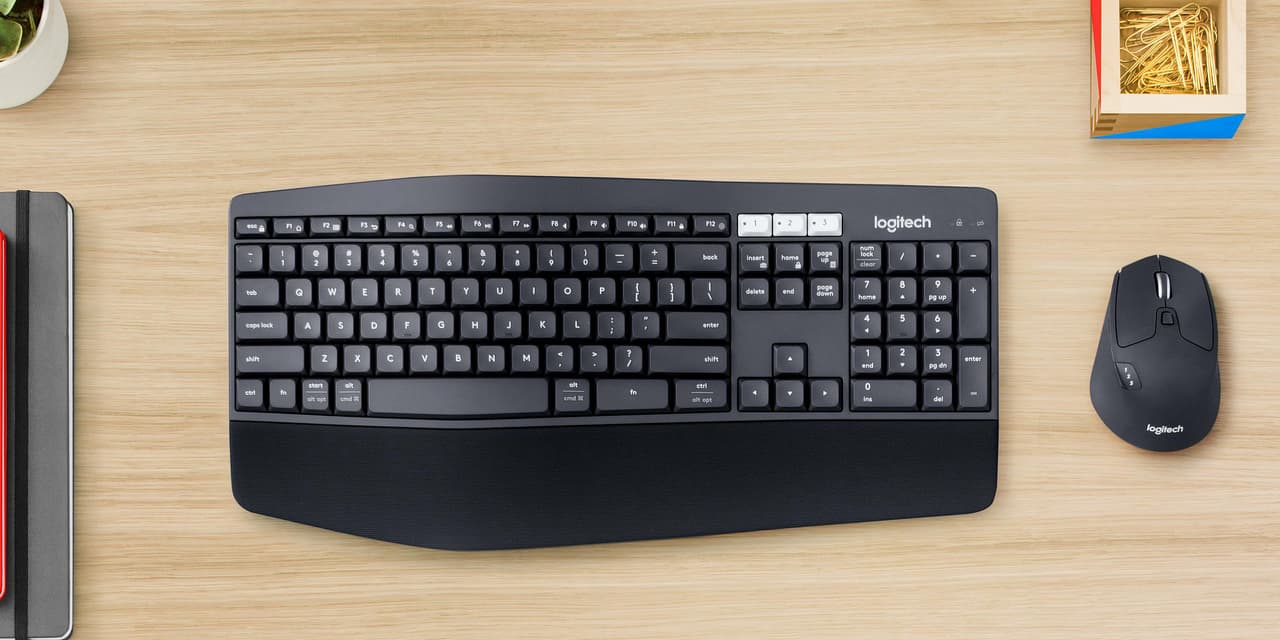
If you bounce between two computers all day, the single biggest quality-of-life upgrade isn't a faster CPU or a fancier monitor. It's a keyboard and mouse that follow you between machines without missing a beat. The Logitech MK850 Performance combo is built for exactly that job: one full-size keyboard and one contoured mouse that each pair with up to three devices and switch with a single button.
The classic use case is a Windows PC for heavy work and a Mac for everything else. With the MK850 you jump from one to the other with a key press: no re-pairing, no unplugging dongles, no second set of peripherals on the desk. This review draws on Logitech's specifications and on patterns in owner reviews (4.1 stars across more than 800 Amazon ratings) to show where it delivers and where buyers run into trouble.
Why a multi-device combo matters
Most people who own two computers end up with two keyboards, two mice and a permanently cluttered desk. The problem isn't just the clutter, it's the friction. Every switch means a different mouse with different sensitivity, a keyboard with a slightly different layout, and a hit to muscle memory.
The MK850 solves this with Logitech's Easy-Switch system. The keyboard pairs with up to three devices and the mouse pairs with up to three as well, and you flip between them using dedicated buttons. A common setup is button 1 for a Windows PC over the bundled USB receiver and button 2 for a Mac over Bluetooth. Switching between devices is the single most praised feature in owner reviews, with owners describing it as quick and easy.
Design and build
This is a full-size keyboard in the truest sense (number pad, function row, the works), finished in a graphite color that blends into a desk setup. It's a membrane keyboard, not mechanical, so if you want clicky switches this isn't your board. That's a deliberate trade in favor of quiet, comfortable typing.
The keys are concave and the keyframe is gently curved, so fingers settle into a natural typing position. The standout comfort feature is the oversized, cushioned palm rest. It's integrated rather than a separate accessory, and in long writing sessions it supports the wrists better than a flat keyboard with no rest. Adjustable tilt legs underneath let you set the angle. Key feel divides owners, though: some call it premium, while others find the membrane keys mushy.
The mouse is a large, contoured, right-handed design with a soft rubber surface. If you have smaller hands or you're left-handed, take note: this is unapologetically a big right-hand mouse. For medium and large hands it's a comfortable palm fit, and the rubber coating makes it easy to grip without feeling slick.
The switching experience
Switching is the headline feature and the reason most people buy this combo, so here is what the evidence says about day-to-day behavior.
When you tap the Easy-Switch button, both the keyboard and the mouse can follow to the next machine. Owner reviews that mention switching are overwhelmingly positive about its speed. Connection stability is more mixed: a meaningful share of owners report dropouts, Bluetooth hiccups or keyboard lag, while others describe the link as rock solid. Using the USB receiver where you can, and keeping it close to the keyboard, is the usual advice for the most stable connection.
Logitech also mapped the keyboard to play nicely with both ecosystems. The modifier keys are labeled and mapped so you're not constantly second-guessing whether you need Cmd or Ctrl, and the layout works correctly on macOS, Windows and ChromeOS. Switching from a Mac shortcut mindset to a Windows one is still on you, but the keyboard itself doesn't get in the way.
Customization with Logitech Options
The MK850's hidden depth is in Logitech's Options software. Install it on each machine and you can remap buttons on both the mouse and the keyboard to create custom shortcuts.
Typical examples are mouse buttons for switching desktops or triggering app-specific shortcuts, and keyboard shortcuts for repetitive tasks. Because the software runs on both Windows and macOS, the same button can do one thing on the PC and something more useful on the Mac. For anyone who lives in their tools all day, this is where the real efficiency gains come from.
Logitech also offers a DuoLink feature through Options that links the keyboard and mouse together for smarter navigation; for example, holding the Fn key on the keyboard changes what the mouse does. It's the kind of power-user touch that doesn't stand out on a spec sheet but becomes habit once it's set up.
Everyday performance
The mouse's hyperfast scroll wheel (a close cousin of the one on the MX Master 3S) free-spins through long documents and web pages when you flick it, then switches back to ratcheted clicks for precision. For anyone who scrolls through long articles, code and spreadsheets all day, it saves a surprising amount of effort. A few owners report the wheel occasionally keeps scrolling on its own.
Tracking is optical and accurate for office work. It's not a gaming mouse (there's no ultra-high DPI sensor or featherweight chassis), but for productivity work it's smooth and precise.
Typing is quiet, which matters in shared homes and on calls. The membrane keys have a soft, cushioned feel rather than a sharp tactile bump, so late-night sessions don't bother anyone else in the house.
Battery life is a strength on paper. The combo runs on replaceable batteries rather than a built-in rechargeable cell, and Logitech rates the keyboard at up to three years between battery changes and the mouse at up to two years. In practice, battery changes are rare enough that they barely register.
Durability is the main caution. Reliability complaints are the most common negative theme in owner reviews, including a keyboard or mouse that stops working after several months, stuck or repeating keys, and unresponsive buttons. It carries a one-year limited hardware warranty, so register it and keep the receipt.
✓ Pros
- ✓ Quick switching between up to three devices on both keyboard and mouse
- ✓ Comfortable full-size keyboard with a large cushioned palm rest
- ✓ Works correctly across Windows, macOS and ChromeOS with proper key mapping
- ✓ Hyperfast scroll wheel is a real productivity boost
- ✓ Deep customization and DuoLink via Logitech Options
✕ Cons
- ✕ Connection stability and long-term reliability draw mixed owner reports
- ✕ Membrane keys won't satisfy mechanical keyboard fans, and some owners find them mushy
- ✕ Mouse is large and right-handed only
- ✕ Takes desk space; this is a full-size board with no compact option
Who it's for
If you regularly work across two or three machines, especially a Windows and Mac combo, this is close to the ideal setup. It's also a strong pick for anyone who wants a comfortable keyboard for long workdays and values quiet typing.
If you're a mechanical keyboard devotee, a left-handed user, or you need a compact, travel-friendly board, this isn't the right fit. Gamers chasing the lowest latency and highest DPI should look at dedicated gaming gear instead.
For the multi-device worker, though, the MK850 hits the exact target it's aiming at: a comfortable combo that makes working across machines effortless, provided your unit holds a stable connection.
Verdict
The Logitech MK850 is one of the most practical multi-device combos you can buy. Switching is fast, the palm rest and quiet keys make long days comfortable, and Logitech Options lets you tailor it to each operating system. The caveats are real: key feel divides buyers, some owners report connection drops and early failures, and the mouse is right-handed only. If your goal is a seamless Windows and Mac desk, it delivers; buy from a seller with easy returns and use the receiver where you can.